Split Sections Aren't Working
Squarespace recently updated some section code, which breaks split section styling on all non-Fluid Engine version templates.
Squarespace recently updated some section code, which breaks split section styling on all non-Fluid Engine version templates.
Cove
Opponent
Parable
Retrograde
How it works
Luckily, it's an easy (but tedious) fix that involves removing a single space from multiple places in the code.
In the Custom CSS window, navigate all the way to the bottom where you see //---MESA OS---// — from there, scroll down a bit more until you get to //---SPLIT SECTIONS---//. These sections of code control the split layout design that put the image on one side and the text on the other.
There are multiple sections of what looks like the same code, but each one is targeting a different combo of custom section height and vertical orientation. Here's the part you're looking for in each section: [data-current-styles*='"customContentWidth": 40'] — see how there's a space before the 40? Remove that. Same goes for [data-current-styles*='"customContentWidth": 50', just remove the space before the 50. There should be two instances of this in each version of this styling.
By my count, there are 24 places in the CSS to make this correction. Sorry in advance — these random, uncalled-for code updates are practically a signature of Squarespace at this point and never get any less annoying.
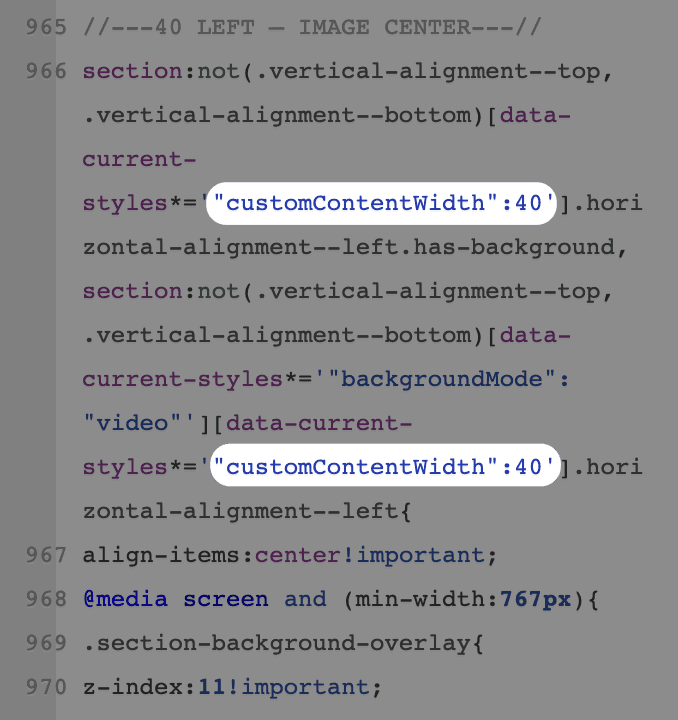
To be clear, here's what it should look like:
After you've removed all the spaces, hit save and your site should be fixed!
Luckily, it's an easy (but tedious) fix that involves removing a single space from multiple places in the code.
In the Custom CSS window, navigate all the way to the bottom where you see //---MESA OS---// — from there, scroll down a bit more until you get to //---SPLIT SECTIONS---//. These sections of code control the split layout design that put the image on one side and the text on the other.
There are multiple sections of what looks like the same code, but each one is targeting a different combo of custom section height and vertical orientation. Here's the part you're looking for in each section: [data-current-styles*='"customContentWidth": 40'] — see how there's a space before the 40? Remove that. Same goes for [data-current-styles*='"customContentWidth": 50', just remove the space before the 50. There should be two instances of this in each version of this styling.
By my count, there are 24 places in the CSS to make this correction. Sorry in advance — these random, uncalled-for code updates are practically a signature of Squarespace at this point and never get any less annoying.
To be clear, here's what it should look like:
After you've removed all the spaces, hit save and your site should be fixed!