Article summary
The best Squarespace template for a church includes pages for sermons, online giving, group signups, kids registration, events, and community info. Free Squarespace templates can work with enough customization, but purpose-built options save significant time. This post covers what to prioritize, what to avoid, and which templates are worth considering in 2026.
What a Church Template Needs to Handle
A church website has different requirements than a business site or a portfolio. The people visiting your church's site are looking for specific things: sermon recordings, service times, directions, ways to give, group signups, kids program info, and event registration. A template that doesn't account for these needs will force you to build most of the site from scratch.
When evaluating templates, look for these features:
Sermon archive or media page — A structured way to browse past sermons by date, series, or speaker
Online giving integration — Space to embed Tithe.ly, Donorbox, Givebutter, or a similar tool
Event calendar or events page — A place to list upcoming services, retreats, volunteer days, and community events
Group or ministry pages — Dedicated space to explain small groups, city groups, or ministry teams and link to signups
Kids and youth section — Parents check this before visiting. It needs to exist and feel intentional.
Plan your visit page — First-time visitors want to know what to expect, where to park, what to wear, and whether there's coffee
If a template covers even half of those out of the box, you're saving hours of layout work.
Free Squarespace Templates
Squarespace 7.1 comes with a set of free starter templates. They're clean, responsive, and functional. But none of them were designed with churches in mind. You'll get a homepage, an about page, a contact page, and maybe a blog. Everything else, you'll need to build yourself.
That means creating sermon pages, giving pages, event layouts, group directories, and kids registration flows from blank sections. It's doable, especially if your church's needs are minimal, but expect to spend a lot more time in the editor.
The main trade-off: free templates cost nothing upfront but require more hours to customize. For a church with a small team and limited web experience, that time cost adds up fast.
Premium Templates Built for Churches
Premium Squarespace templates designed for specific niches save time by starting you closer to the finish line. Instead of building every page from a blank canvas, you get a structure that already reflects how a church website needs to function.
Cove by Studio Mesa
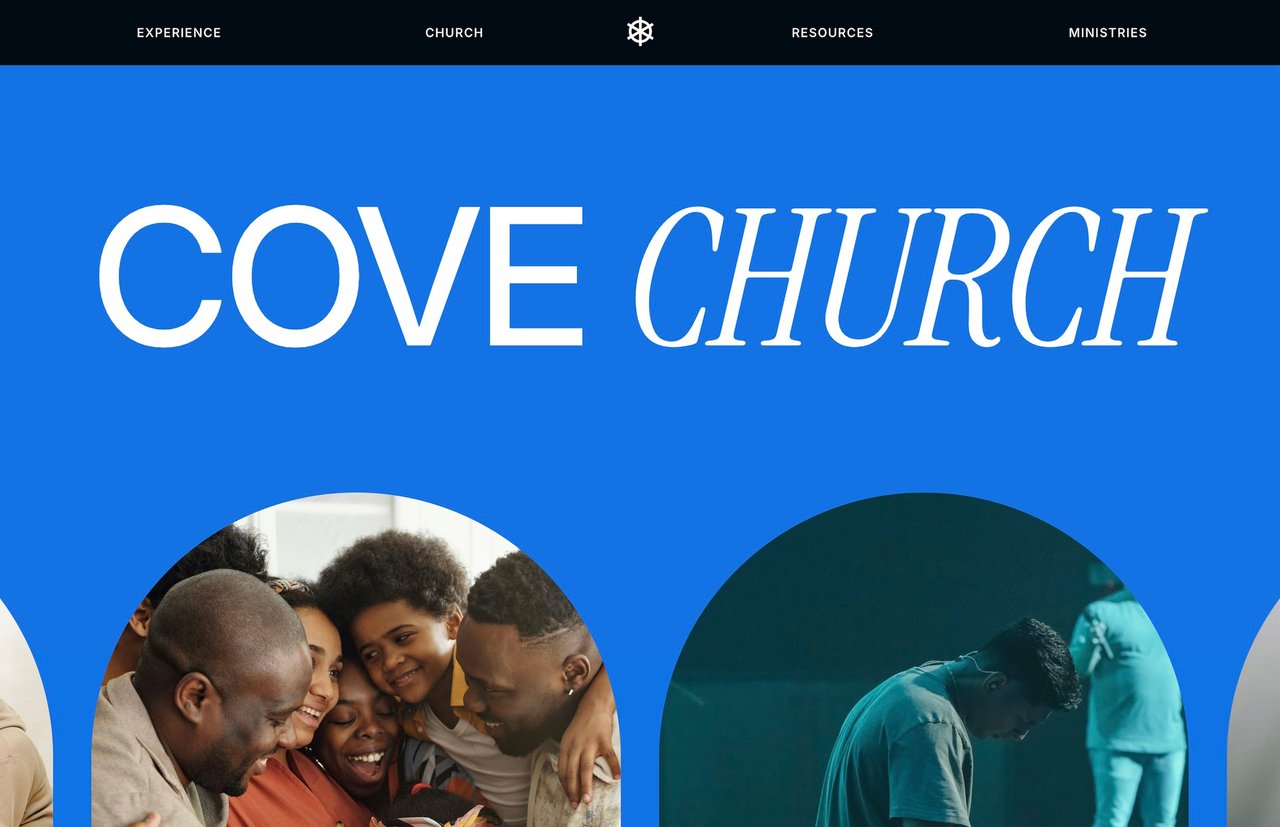
Cove is a 15-page Squarespace template designed specifically for churches. It includes pages for sermons, online giving, small group signups, kids registration, events, a blog, and a plan-your-visit page. The design is bold and modern without feeling trendy, and the layout is structured around the way a modern church actually operates online.
Key features:
Sermon archive page with space for video, audio, and notes
Dedicated giving page designed for embedding donation tools
City groups page with signup integration
Kids ministry page
Events page with calendar layout
Plan your visit page for first-time guests
Blog for weekly updates and announcements
Cove comes with an unlimited license, lifetime email support, and template documentation. If you're building a church site and want to skip the blank-page phase, it's the most purpose-built option available for Squarespace.
For a full walkthrough of building a church site on the platform, read How to Build a Church Website on Squarespace.
What to Avoid
A few things to watch for when shopping for church templates:
Templates with heavy e-commerce focus. If the template is built around a product catalog and shopping cart, you'll spend more time removing features than adding church-specific ones.
Overly minimal designs. A one-page or three-page template might look sleek, but churches need depth. Sermons, groups, kids, giving, events, and a blog don't fit on three pages without cramming.
Templates without mobile optimization. A surprising number of premium templates look great on desktop and fall apart on a phone. Test the demo on your phone before buying anything.
Outdated Squarespace versions. Make sure any template you're considering is built on Squarespace 7.1 Fluid Engine. Older 7.0 or 7.1 Classic templates are limited in layout flexibility and won't receive future Squarespace updates.
How to Evaluate a Template Demo
Before purchasing any template, spend 10 minutes with the demo site:
Click through every page. Check whether the pages that matter to your church actually exist, or if you'd need to create them from scratch.
Test it on mobile. Pull up the demo on your phone. Check navigation, readability, and form layouts.
Look at the page count. More pages means more structure already built for you. A 15-page template saves dramatically more time than a 3-page template.
Check for documentation. Good templates come with guides that explain how to customize each section. This matters more than people think, especially when a volunteer is doing the building.
Read the license terms. If you're a designer building church sites for multiple congregations, an unlimited license lets you reuse the template across projects.
For more guidance on evaluating templates, the Premium Squarespace Templates Buyer's Guide covers what to look for in detail.
Start Building
Your church's website is often the first impression someone gets before ever walking through the doors. A template that handles the pages and features churches actually need makes the difference between launching this month and stalling for six.
If you're ready to build, view the Cove demo to see what a church-specific Squarespace template looks like in practice. And for step-by-step guidance on structuring the whole site, start with How to Build a Church Website on Squarespace.
Related reading: How to Build a Church Website on Squarespace · How to Set Up Online Donations on a Squarespace Website · Premium Squarespace Templates vs. Free: Is It Worth Paying?
Article summary
The best Squarespace template for a church includes pages for sermons, online giving, group signups, kids registration, events, and community info. Free Squarespace templates can work with enough customization, but purpose-built options save significant time. This post covers what to prioritize, what to avoid, and which templates are worth considering in 2026.
What a Church Template Needs to Handle
A church website has different requirements than a business site or a portfolio. The people visiting your church's site are looking for specific things: sermon recordings, service times, directions, ways to give, group signups, kids program info, and event registration. A template that doesn't account for these needs will force you to build most of the site from scratch.
When evaluating templates, look for these features:
Sermon archive or media page — A structured way to browse past sermons by date, series, or speaker
Online giving integration — Space to embed Tithe.ly, Donorbox, Givebutter, or a similar tool
Event calendar or events page — A place to list upcoming services, retreats, volunteer days, and community events
Group or ministry pages — Dedicated space to explain small groups, city groups, or ministry teams and link to signups
Kids and youth section — Parents check this before visiting. It needs to exist and feel intentional.
Plan your visit page — First-time visitors want to know what to expect, where to park, what to wear, and whether there's coffee
If a template covers even half of those out of the box, you're saving hours of layout work.
Free Squarespace Templates
Squarespace 7.1 comes with a set of free starter templates. They're clean, responsive, and functional. But none of them were designed with churches in mind. You'll get a homepage, an about page, a contact page, and maybe a blog. Everything else, you'll need to build yourself.
That means creating sermon pages, giving pages, event layouts, group directories, and kids registration flows from blank sections. It's doable, especially if your church's needs are minimal, but expect to spend a lot more time in the editor.
The main trade-off: free templates cost nothing upfront but require more hours to customize. For a church with a small team and limited web experience, that time cost adds up fast.
Premium Templates Built for Churches
Premium Squarespace templates designed for specific niches save time by starting you closer to the finish line. Instead of building every page from a blank canvas, you get a structure that already reflects how a church website needs to function.
Cove by Studio Mesa
Cove is a 15-page Squarespace template designed specifically for churches. It includes pages for sermons, online giving, small group signups, kids registration, events, a blog, and a plan-your-visit page. The design is bold and modern without feeling trendy, and the layout is structured around the way a modern church actually operates online.
Key features:
Sermon archive page with space for video, audio, and notes
Dedicated giving page designed for embedding donation tools
City groups page with signup integration
Kids ministry page
Events page with calendar layout
Plan your visit page for first-time guests
Blog for weekly updates and announcements
Cove comes with an unlimited license, lifetime email support, and template documentation. If you're building a church site and want to skip the blank-page phase, it's the most purpose-built option available for Squarespace.
For a full walkthrough of building a church site on the platform, read How to Build a Church Website on Squarespace.
What to Avoid
A few things to watch for when shopping for church templates:
Templates with heavy e-commerce focus. If the template is built around a product catalog and shopping cart, you'll spend more time removing features than adding church-specific ones.
Overly minimal designs. A one-page or three-page template might look sleek, but churches need depth. Sermons, groups, kids, giving, events, and a blog don't fit on three pages without cramming.
Templates without mobile optimization. A surprising number of premium templates look great on desktop and fall apart on a phone. Test the demo on your phone before buying anything.
Outdated Squarespace versions. Make sure any template you're considering is built on Squarespace 7.1 Fluid Engine. Older 7.0 or 7.1 Classic templates are limited in layout flexibility and won't receive future Squarespace updates.
How to Evaluate a Template Demo
Before purchasing any template, spend 10 minutes with the demo site:
Click through every page. Check whether the pages that matter to your church actually exist, or if you'd need to create them from scratch.
Test it on mobile. Pull up the demo on your phone. Check navigation, readability, and form layouts.
Look at the page count. More pages means more structure already built for you. A 15-page template saves dramatically more time than a 3-page template.
Check for documentation. Good templates come with guides that explain how to customize each section. This matters more than people think, especially when a volunteer is doing the building.
Read the license terms. If you're a designer building church sites for multiple congregations, an unlimited license lets you reuse the template across projects.
For more guidance on evaluating templates, the Premium Squarespace Templates Buyer's Guide covers what to look for in detail.
Start Building
Your church's website is often the first impression someone gets before ever walking through the doors. A template that handles the pages and features churches actually need makes the difference between launching this month and stalling for six.
If you're ready to build, view the Cove demo to see what a church-specific Squarespace template looks like in practice. And for step-by-step guidance on structuring the whole site, start with How to Build a Church Website on Squarespace.
Related reading: How to Build a Church Website on Squarespace · How to Set Up Online Donations on a Squarespace Website · Premium Squarespace Templates vs. Free: Is It Worth Paying?
Article summary
The best Squarespace template for a church includes pages for sermons, online giving, group signups, kids registration, events, and community info. Free Squarespace templates can work with enough customization, but purpose-built options save significant time. This post covers what to prioritize, what to avoid, and which templates are worth considering in 2026.
What a Church Template Needs to Handle
A church website has different requirements than a business site or a portfolio. The people visiting your church's site are looking for specific things: sermon recordings, service times, directions, ways to give, group signups, kids program info, and event registration. A template that doesn't account for these needs will force you to build most of the site from scratch.
When evaluating templates, look for these features:
Sermon archive or media page — A structured way to browse past sermons by date, series, or speaker
Online giving integration — Space to embed Tithe.ly, Donorbox, Givebutter, or a similar tool
Event calendar or events page — A place to list upcoming services, retreats, volunteer days, and community events
Group or ministry pages — Dedicated space to explain small groups, city groups, or ministry teams and link to signups
Kids and youth section — Parents check this before visiting. It needs to exist and feel intentional.
Plan your visit page — First-time visitors want to know what to expect, where to park, what to wear, and whether there's coffee
If a template covers even half of those out of the box, you're saving hours of layout work.
Free Squarespace Templates
Squarespace 7.1 comes with a set of free starter templates. They're clean, responsive, and functional. But none of them were designed with churches in mind. You'll get a homepage, an about page, a contact page, and maybe a blog. Everything else, you'll need to build yourself.
That means creating sermon pages, giving pages, event layouts, group directories, and kids registration flows from blank sections. It's doable, especially if your church's needs are minimal, but expect to spend a lot more time in the editor.
The main trade-off: free templates cost nothing upfront but require more hours to customize. For a church with a small team and limited web experience, that time cost adds up fast.
Premium Templates Built for Churches
Premium Squarespace templates designed for specific niches save time by starting you closer to the finish line. Instead of building every page from a blank canvas, you get a structure that already reflects how a church website needs to function.
Cove by Studio Mesa
Cove is a 15-page Squarespace template designed specifically for churches. It includes pages for sermons, online giving, small group signups, kids registration, events, a blog, and a plan-your-visit page. The design is bold and modern without feeling trendy, and the layout is structured around the way a modern church actually operates online.
Key features:
Sermon archive page with space for video, audio, and notes
Dedicated giving page designed for embedding donation tools
City groups page with signup integration
Kids ministry page
Events page with calendar layout
Plan your visit page for first-time guests
Blog for weekly updates and announcements
Cove comes with an unlimited license, lifetime email support, and template documentation. If you're building a church site and want to skip the blank-page phase, it's the most purpose-built option available for Squarespace.
For a full walkthrough of building a church site on the platform, read How to Build a Church Website on Squarespace.
What to Avoid
A few things to watch for when shopping for church templates:
Templates with heavy e-commerce focus. If the template is built around a product catalog and shopping cart, you'll spend more time removing features than adding church-specific ones.
Overly minimal designs. A one-page or three-page template might look sleek, but churches need depth. Sermons, groups, kids, giving, events, and a blog don't fit on three pages without cramming.
Templates without mobile optimization. A surprising number of premium templates look great on desktop and fall apart on a phone. Test the demo on your phone before buying anything.
Outdated Squarespace versions. Make sure any template you're considering is built on Squarespace 7.1 Fluid Engine. Older 7.0 or 7.1 Classic templates are limited in layout flexibility and won't receive future Squarespace updates.
How to Evaluate a Template Demo
Before purchasing any template, spend 10 minutes with the demo site:
Click through every page. Check whether the pages that matter to your church actually exist, or if you'd need to create them from scratch.
Test it on mobile. Pull up the demo on your phone. Check navigation, readability, and form layouts.
Look at the page count. More pages means more structure already built for you. A 15-page template saves dramatically more time than a 3-page template.
Check for documentation. Good templates come with guides that explain how to customize each section. This matters more than people think, especially when a volunteer is doing the building.
Read the license terms. If you're a designer building church sites for multiple congregations, an unlimited license lets you reuse the template across projects.
For more guidance on evaluating templates, the Premium Squarespace Templates Buyer's Guide covers what to look for in detail.
Start Building
Your church's website is often the first impression someone gets before ever walking through the doors. A template that handles the pages and features churches actually need makes the difference between launching this month and stalling for six.
If you're ready to build, view the Cove demo to see what a church-specific Squarespace template looks like in practice. And for step-by-step guidance on structuring the whole site, start with How to Build a Church Website on Squarespace.
Related reading: How to Build a Church Website on Squarespace · How to Set Up Online Donations on a Squarespace Website · Premium Squarespace Templates vs. Free: Is It Worth Paying?