Article chapters

Article chapters

Article chapters

Guides

How to Build a Church Website on Squarespace

How to Build a Church Website on Squarespace

A church website should do more than announce Sunday service times. It should help people find you, learn what to expect, watch past sermons, give online, sign up for groups, register their kids, and feel like they belong before they ever walk through the door. Here's how to build one that actually serves your congregation.

A church website should do more than announce Sunday service times. It should help people find you, learn what to expect, watch past sermons, give online, sign up for groups, register their kids, and feel like they belong before they ever walk through the door. Here's how to build one that actually serves your congregation.

Article summary

Most church websites are digital brochures with service times and an address. A useful church website operates more like a hub: sermon archives, online giving, group signups, kids registration, event calendars, and community info all in one place. This guide covers the pages your church actually needs, how to structure them, design principles that feel welcoming without being generic, common mistakes to avoid, and how to choose a Squarespace template that fits how a modern church operates online.

What a church website actually needs to do

Think about the people visiting your church's website. Some are first-time visitors trying to figure out if your church is right for them. Some are regular members looking for this week's sermon, group schedule, or event registration. Some are parents checking whether you have a kids program before they commit to visiting. Some just want to give.

Each of those people needs to find what they're looking for quickly, without clicking through five pages or guessing where things are hidden. A church website that only has a homepage, an about page, and a contact form leaves most of those people stranded.

The goal is to build a site that functions as an always-available extension of your church, not a placeholder between Sundays.

The pages your church website should include

Every church is different, but the majority need more pages than they think. Here's the core set, along with what each page should accomplish.

Homepage

Your homepage sets the tone for everything. A first-time visitor should be able to answer three questions within a few seconds of landing: What kind of church is this? When and where do you meet? How do I take the next step?

Lead with something human. A strong photo of your community, a clear headline about your mission, and a visible button for new visitors ("Plan Your Visit" or "What to Expect") does more than a slideshow of event graphics ever will.

Keep the homepage focused. It's a gateway, not an encyclopedia. Link out to deeper pages rather than cramming everything onto one scroll.

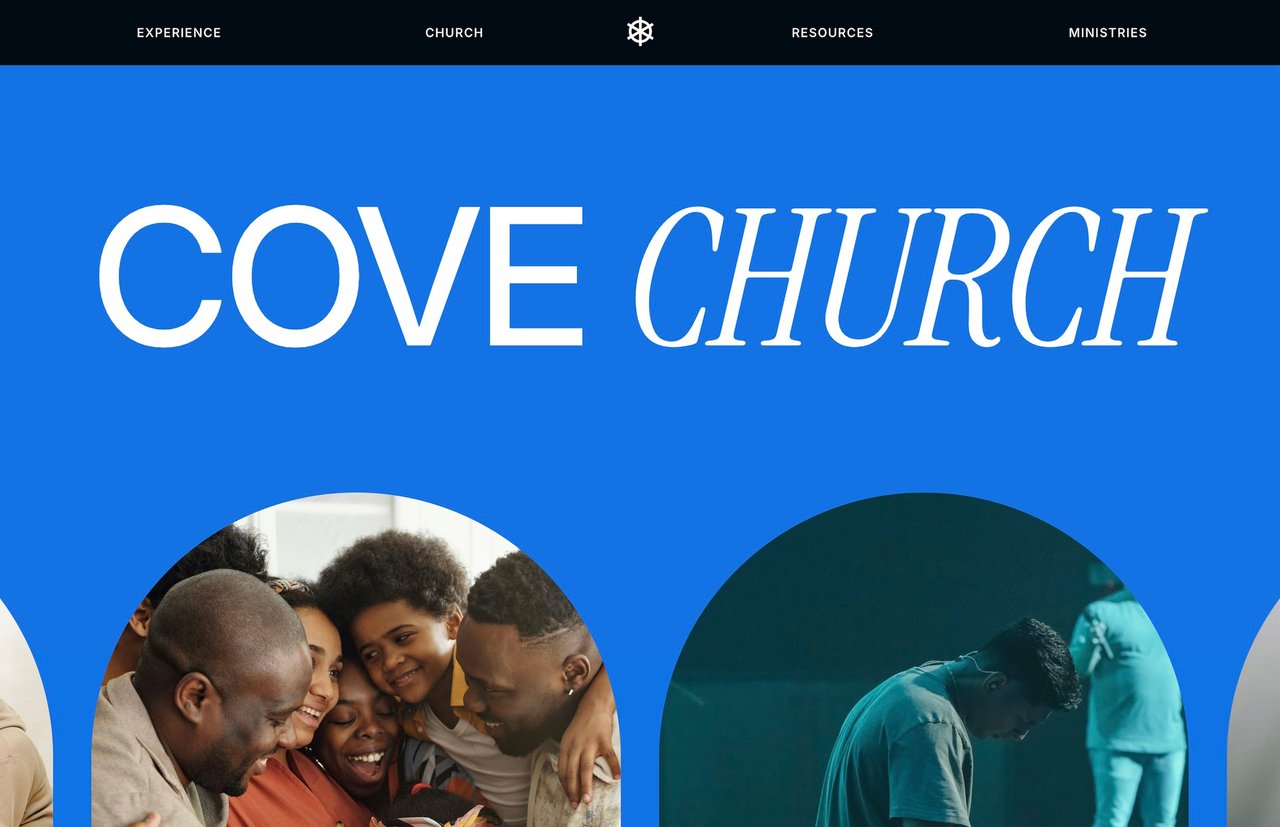
Cove template for churches by Studio Mesa


Sermon archive

For many church members, this is the most-visited page on the site. People miss Sundays. Visitors want to hear the teaching before they show up. Small group leaders reference past messages during the week.

Structure your sermon archive so people can browse by series, date, or speaker. Embed video directly on the page (YouTube or Vimeo both work with Squarespace) and include sermon notes or discussion questions if your church produces them. A blog-based layout works well here since Squarespace's blog functionality supports categories, tags, and chronological browsing out of the box.

Online giving

Online giving should be effortless. If someone has to hunt for the donate button or navigate away from your site to a third-party platform, you're adding friction to an act of generosity.

Squarespace has a built-in donation block that supports one-time and recurring gifts through Stripe or PayPal. You can set suggested amounts, create multiple funds (general, missions, building, benevolence), and customize the receipt donors see after giving.

The donate button should be visible on every page of your site, ideally in the main navigation or the footer. Don't make people search for it.

If your church uses a third-party giving platform like Tithe.ly, Donorbox, or Givebutter, you can embed their forms directly into a Squarespace page so the experience still feels seamless.

Groups and community

Most churches have some version of small groups, city groups, life groups, or community groups. These are often the real entry point into church life, and they deserve more than a passing mention on your homepage.

Create a dedicated page that explains what groups are, how they work, when they meet, and how to sign up. If your church has multiple types of groups (men's, women's, young adults, neighborhood-based), organize them with clear categories so people can find what fits.

For signups, a simple Squarespace form works. If you use a church management tool like Planning Center or Church Center, link directly to the relevant signup page.

Kids and family

Parents will check your kids program before they visit. That's just how it works. If they can't find clear information about what you offer for children, how check-in works, and what safety protocols are in place, many won't come.

A dedicated kids page should cover age ranges, what a typical Sunday looks like for kids, your approach to safety and check-in, and how to register. Photos of real kids ministry environments (with appropriate permissions) go a long way toward making parents feel comfortable.

Events

Church life runs on events: services, conferences, volunteer days, community outreach, holiday gatherings, baptisms. An events page keeps everything in one place and gives your congregation a single URL to check.

Squarespace doesn't have a built-in event calendar that matches what most churches need, but you can build a solid events page using a blog layout (one post per event, sorted by date) or embed a third-party calendar. Keep each event listing focused: what it is, when it is, where it is, and how to sign up.

About and beliefs

First-time visitors want to know what your church believes, who leads it, and what the culture feels like. Your about page should cover your mission, your values, and your leadership team. A separate beliefs or doctrine page can go deeper for those who want it.

Write in plain language. Avoid insider terminology that only makes sense to people already in church culture. Someone checking out your beliefs page might be visiting a church for the first time in their life.

Plan your visit

This is one of the highest-value pages on a church website, and many churches don't have one at all. A "Plan Your Visit" or "New Here" page removes every barrier to showing up for the first time.

Cover the basics: where to park, which door to enter, what to wear, how long the service lasts, whether there's coffee, what the kids program looks like, and what to expect from the actual service. A short video walkthrough of a Sunday morning is even better.

The tone here matters. Be warm and specific. "Come as you are" is nice sentiment but doesn't tell someone where the parking lot is.

Blog or news

A blog serves two purposes for a church: keeping your congregation informed and building organic search visibility. Weekly updates, sermon discussion guides, ministry highlights, and event recaps all work.

From an SEO perspective, blog posts targeting local searches ("churches in [city]," "Christmas Eve service [city]," "youth group [city]") help new people find you through Google. One post per week is plenty to build momentum.

Contact

Simple and clear. Address, phone number, email, office hours, and a contact form. Include an embedded Google Map so people can get directions with one click.


Design principles for church websites

Warm but not cheesy

Church websites have a reputation for looking dated, overly corporate, or aggressively trendy. The sweet spot is warm, modern, and clean. Think of the feeling you want someone to have when they walk into your building for the first time, and translate that to the screen.

Use real photography of your community wherever possible. Stock photos of diverse groups holding hands in a field don't build trust. An actual photo of your worship team, your lobby, or your kids program does.

Clear navigation

A church website has more moving parts than most small business sites. Sermons, groups, events, giving, kids, beliefs, contact. That's a lot of pages. Organize your navigation with dropdown menus so the top-level menu stays simple (maybe five or six items) while the full depth of the site is easily accessible.

Don't hide critical pages. "Give" and "Plan Your Visit" should be in the main navigation or as a prominent button, not buried three clicks deep.

Mobile-first

A significant portion of your visitors are checking the website on their phone, either on Sunday morning to confirm service times or during the week to look something up. Every page should be tested on mobile. Navigation should be easy to tap, text should be readable without zooming, and giving should work smoothly on a phone screen.


Mobile screens on Cove by Studio Mesa

Consistent brand

Your website, social media, print materials, and physical space should feel like they belong to the same organization. Use the same fonts, colors, and photography style across everything. This sounds obvious, but many churches have a polished Instagram presence and a website that looks like it was built in 2014.

Common mistakes church websites make

Overloading the homepage

Putting every announcement, event graphic, sermon video, and ministry highlight on the homepage creates visual noise. People don't know where to look. Keep the homepage focused on a few key actions (visit, watch, give, connect) and let inner pages carry the details.

Neglecting the sermon archive

For many regular attendees, the sermon archive is the primary reason they visit the site during the week. If it's disorganized, hard to search, or several weeks behind, you're failing the people who are most engaged with your church.

Making giving difficult

If the give button opens a new tab to a third-party site with a clunky form, you're losing donations. Embed giving directly on your site. Make it one click from anywhere on the site. Offer recurring giving prominently.

Using insider language

"Join us for B3 this Wednesday in the Upper Room for a time of equipping and fellowship." That sentence is meaningless to someone who isn't already part of your church. Write every page as if the reader is visiting for the first time.

Letting the site go stale

A church website with event graphics from three months ago and a blog that hasn't been updated since last year communicates that no one is paying attention. Assign someone on your team to update the site weekly, even if it's just swapping the homepage sermon link and updating the events page.


Choosing a Squarespace template for your church

Squarespace is a strong choice for churches because it's easy enough for a volunteer to manage, professional enough to represent your church well, and doesn't require a developer on staff to maintain.

What to look for

Most of Squarespace's free templates were designed for businesses, photographers, or restaurants. They work, but you'll spend a lot of time adapting them to fit church-specific needs like sermon archives, group signups, and giving pages. You'll also likely end up with fewer pages than you need unless you build each one from scratch.

When evaluating templates for a church, look for:

  • Enough pages to support sermons, groups, kids, events, giving, and a blog

  • A warm, welcoming design direction that doesn't feel corporate

  • Clear navigation that can handle 8-10+ pages without getting cluttered

  • Built-in support for video embeds (for sermons and livestreaming)

  • A giving/donation flow that's integrated into the site

A purpose-built option

Cove is a Squarespace template designed specifically for churches. It includes 15 pages built around how a modern church actually operates online: watch services, give online, read sermon notes, sign up for city groups, register kids, browse events, and more. If you want to see what a church-specific Squarespace template looks like in practice, view the Cove demo.

That said, if your church's needs are simpler or your budget is tight, a free Squarespace template with the right amount of time and intention can produce a good result. The key is making sure you build out enough pages to actually serve your congregation rather than settling for a three-page site because that's all the template came with.

Getting found online

Most people searching for a church are searching locally. "Churches near me," "church in [city]," "[denomination] church [neighborhood]." Basic SEO practices make a meaningful difference in whether your church shows up in those searches.

Claim your Google Business Profile

This is the single most impactful thing you can do for local visibility. Your Google Business Profile controls what people see when they search for your church by name and influences whether you appear in "churches near me" searches. Fill out every field: address, hours, service times, photos, website link, and a description that includes your city and neighborhood.

Use local keywords naturally

Your city, neighborhood, and region should appear in your page titles, headings, and body text. Not stuffed in awkwardly, just present. "Grace Community Church is a non-denominational church in East Nashville" is natural and useful for search engines.

Blog with local intent

Write about things happening in your community, not just within your church. A recap of a community service event, a post about welcoming new families in your neighborhood, or a holiday service guide that mentions your city all help build local search relevance.

For more depth on Squarespace SEO, check out The Complete Guide to Squarespace SEO.

A realistic launch timeline

Churches often have the added complexity of needing volunteer or committee buy-in before changes go live. Here's a realistic timeline assuming one or two people are doing the actual building.

Week 1: Choose your platform and template. Gather existing content (sermon videos, group info, event details, staff photos). Outline your page structure.

Week 2: Build the homepage, about/beliefs, and plan your visit pages. These are the highest-priority pages for first-time visitors.

Week 3: Build the sermon archive, groups page, kids page, and events page. Set up your giving integration.

Week 4: Build the blog, contact page, and any remaining pages. Test everything on mobile. Have a few people outside your church staff navigate the site and tell you where they get confused.

Week 5: Final review, launch, and update your Google Business Profile with the new site URL.

Five weeks is realistic without rushing. The site doesn't need to be perfect at launch. Get it live, then improve it over time as you learn what your congregation actually uses most.


Start building

Your church's website is often the first impression someone has of your community. A clear, well-structured site that anticipates what visitors and members need can do more for your church's reach than any social media strategy.

Whether you start with a free template or a purpose-built option like Cove, the most important step is getting something live that actually reflects the life of your church, not just the Sunday bulletin.

For more on building effective Squarespace sites, explore 25 Best Practices for Building Sites with Squarespace or How to Set Up Online Donations on a Squarespace Website.

Article summary

Most church websites are digital brochures with service times and an address. A useful church website operates more like a hub: sermon archives, online giving, group signups, kids registration, event calendars, and community info all in one place. This guide covers the pages your church actually needs, how to structure them, design principles that feel welcoming without being generic, common mistakes to avoid, and how to choose a Squarespace template that fits how a modern church operates online.

What a church website actually needs to do

Think about the people visiting your church's website. Some are first-time visitors trying to figure out if your church is right for them. Some are regular members looking for this week's sermon, group schedule, or event registration. Some are parents checking whether you have a kids program before they commit to visiting. Some just want to give.

Each of those people needs to find what they're looking for quickly, without clicking through five pages or guessing where things are hidden. A church website that only has a homepage, an about page, and a contact form leaves most of those people stranded.

The goal is to build a site that functions as an always-available extension of your church, not a placeholder between Sundays.

The pages your church website should include

Every church is different, but the majority need more pages than they think. Here's the core set, along with what each page should accomplish.

Homepage

Your homepage sets the tone for everything. A first-time visitor should be able to answer three questions within a few seconds of landing: What kind of church is this? When and where do you meet? How do I take the next step?

Lead with something human. A strong photo of your community, a clear headline about your mission, and a visible button for new visitors ("Plan Your Visit" or "What to Expect") does more than a slideshow of event graphics ever will.

Keep the homepage focused. It's a gateway, not an encyclopedia. Link out to deeper pages rather than cramming everything onto one scroll.

Cove template for churches by Studio Mesa


Sermon archive

For many church members, this is the most-visited page on the site. People miss Sundays. Visitors want to hear the teaching before they show up. Small group leaders reference past messages during the week.

Structure your sermon archive so people can browse by series, date, or speaker. Embed video directly on the page (YouTube or Vimeo both work with Squarespace) and include sermon notes or discussion questions if your church produces them. A blog-based layout works well here since Squarespace's blog functionality supports categories, tags, and chronological browsing out of the box.

Online giving

Online giving should be effortless. If someone has to hunt for the donate button or navigate away from your site to a third-party platform, you're adding friction to an act of generosity.

Squarespace has a built-in donation block that supports one-time and recurring gifts through Stripe or PayPal. You can set suggested amounts, create multiple funds (general, missions, building, benevolence), and customize the receipt donors see after giving.

The donate button should be visible on every page of your site, ideally in the main navigation or the footer. Don't make people search for it.

If your church uses a third-party giving platform like Tithe.ly, Donorbox, or Givebutter, you can embed their forms directly into a Squarespace page so the experience still feels seamless.

Groups and community

Most churches have some version of small groups, city groups, life groups, or community groups. These are often the real entry point into church life, and they deserve more than a passing mention on your homepage.

Create a dedicated page that explains what groups are, how they work, when they meet, and how to sign up. If your church has multiple types of groups (men's, women's, young adults, neighborhood-based), organize them with clear categories so people can find what fits.

For signups, a simple Squarespace form works. If you use a church management tool like Planning Center or Church Center, link directly to the relevant signup page.

Kids and family

Parents will check your kids program before they visit. That's just how it works. If they can't find clear information about what you offer for children, how check-in works, and what safety protocols are in place, many won't come.

A dedicated kids page should cover age ranges, what a typical Sunday looks like for kids, your approach to safety and check-in, and how to register. Photos of real kids ministry environments (with appropriate permissions) go a long way toward making parents feel comfortable.

Events

Church life runs on events: services, conferences, volunteer days, community outreach, holiday gatherings, baptisms. An events page keeps everything in one place and gives your congregation a single URL to check.

Squarespace doesn't have a built-in event calendar that matches what most churches need, but you can build a solid events page using a blog layout (one post per event, sorted by date) or embed a third-party calendar. Keep each event listing focused: what it is, when it is, where it is, and how to sign up.

About and beliefs

First-time visitors want to know what your church believes, who leads it, and what the culture feels like. Your about page should cover your mission, your values, and your leadership team. A separate beliefs or doctrine page can go deeper for those who want it.

Write in plain language. Avoid insider terminology that only makes sense to people already in church culture. Someone checking out your beliefs page might be visiting a church for the first time in their life.

Plan your visit

This is one of the highest-value pages on a church website, and many churches don't have one at all. A "Plan Your Visit" or "New Here" page removes every barrier to showing up for the first time.

Cover the basics: where to park, which door to enter, what to wear, how long the service lasts, whether there's coffee, what the kids program looks like, and what to expect from the actual service. A short video walkthrough of a Sunday morning is even better.

The tone here matters. Be warm and specific. "Come as you are" is nice sentiment but doesn't tell someone where the parking lot is.

Blog or news

A blog serves two purposes for a church: keeping your congregation informed and building organic search visibility. Weekly updates, sermon discussion guides, ministry highlights, and event recaps all work.

From an SEO perspective, blog posts targeting local searches ("churches in [city]," "Christmas Eve service [city]," "youth group [city]") help new people find you through Google. One post per week is plenty to build momentum.

Contact

Simple and clear. Address, phone number, email, office hours, and a contact form. Include an embedded Google Map so people can get directions with one click.


Design principles for church websites

Warm but not cheesy

Church websites have a reputation for looking dated, overly corporate, or aggressively trendy. The sweet spot is warm, modern, and clean. Think of the feeling you want someone to have when they walk into your building for the first time, and translate that to the screen.

Use real photography of your community wherever possible. Stock photos of diverse groups holding hands in a field don't build trust. An actual photo of your worship team, your lobby, or your kids program does.

Clear navigation

A church website has more moving parts than most small business sites. Sermons, groups, events, giving, kids, beliefs, contact. That's a lot of pages. Organize your navigation with dropdown menus so the top-level menu stays simple (maybe five or six items) while the full depth of the site is easily accessible.

Don't hide critical pages. "Give" and "Plan Your Visit" should be in the main navigation or as a prominent button, not buried three clicks deep.

Mobile-first

A significant portion of your visitors are checking the website on their phone, either on Sunday morning to confirm service times or during the week to look something up. Every page should be tested on mobile. Navigation should be easy to tap, text should be readable without zooming, and giving should work smoothly on a phone screen.


Mobile screens on Cove by Studio Mesa

Consistent brand

Your website, social media, print materials, and physical space should feel like they belong to the same organization. Use the same fonts, colors, and photography style across everything. This sounds obvious, but many churches have a polished Instagram presence and a website that looks like it was built in 2014.


Common mistakes church websites make

Overloading the homepage

Putting every announcement, event graphic, sermon video, and ministry highlight on the homepage creates visual noise. People don't know where to look. Keep the homepage focused on a few key actions (visit, watch, give, connect) and let inner pages carry the details.

Neglecting the sermon archive

For many regular attendees, the sermon archive is the primary reason they visit the site during the week. If it's disorganized, hard to search, or several weeks behind, you're failing the people who are most engaged with your church.

Making giving difficult

If the give button opens a new tab to a third-party site with a clunky form, you're losing donations. Embed giving directly on your site. Make it one click from anywhere on the site. Offer recurring giving prominently.

Using insider language

"Join us for B3 this Wednesday in the Upper Room for a time of equipping and fellowship." That sentence is meaningless to someone who isn't already part of your church. Write every page as if the reader is visiting for the first time.

Letting the site go stale

A church website with event graphics from three months ago and a blog that hasn't been updated since last year communicates that no one is paying attention. Assign someone on your team to update the site weekly, even if it's just swapping the homepage sermon link and updating the events page.


Choosing a Squarespace template for your church

Squarespace is a strong choice for churches because it's easy enough for a volunteer to manage, professional enough to represent your church well, and doesn't require a developer on staff to maintain.

What to look for

Most of Squarespace's free templates were designed for businesses, photographers, or restaurants. They work, but you'll spend a lot of time adapting them to fit church-specific needs like sermon archives, group signups, and giving pages. You'll also likely end up with fewer pages than you need unless you build each one from scratch.

When evaluating templates for a church, look for:

  • Enough pages to support sermons, groups, kids, events, giving, and a blog

  • A warm, welcoming design direction that doesn't feel corporate

  • Clear navigation that can handle 8-10+ pages without getting cluttered

  • Built-in support for video embeds (for sermons and livestreaming)

  • A giving/donation flow that's integrated into the site

A purpose-built option

Cove is a Squarespace template designed specifically for churches. It includes 15 pages built around how a modern church actually operates online: watch services, give online, read sermon notes, sign up for city groups, register kids, browse events, and more. If you want to see what a church-specific Squarespace template looks like in practice, view the Cove demo.

That said, if your church's needs are simpler or your budget is tight, a free Squarespace template with the right amount of time and intention can produce a good result. The key is making sure you build out enough pages to actually serve your congregation rather than settling for a three-page site because that's all the template came with.

Getting found online

Most people searching for a church are searching locally. "Churches near me," "church in [city]," "[denomination] church [neighborhood]." Basic SEO practices make a meaningful difference in whether your church shows up in those searches.

Claim your Google Business Profile

This is the single most impactful thing you can do for local visibility. Your Google Business Profile controls what people see when they search for your church by name and influences whether you appear in "churches near me" searches. Fill out every field: address, hours, service times, photos, website link, and a description that includes your city and neighborhood.

Use local keywords naturally

Your city, neighborhood, and region should appear in your page titles, headings, and body text. Not stuffed in awkwardly, just present. "Grace Community Church is a non-denominational church in East Nashville" is natural and useful for search engines.

Blog with local intent

Write about things happening in your community, not just within your church. A recap of a community service event, a post about welcoming new families in your neighborhood, or a holiday service guide that mentions your city all help build local search relevance.

For more depth on Squarespace SEO, check out The Complete Guide to Squarespace SEO.

A realistic launch timeline

Churches often have the added complexity of needing volunteer or committee buy-in before changes go live. Here's a realistic timeline assuming one or two people are doing the actual building.

Week 1: Choose your platform and template. Gather existing content (sermon videos, group info, event details, staff photos). Outline your page structure.

Week 2: Build the homepage, about/beliefs, and plan your visit pages. These are the highest-priority pages for first-time visitors.

Week 3: Build the sermon archive, groups page, kids page, and events page. Set up your giving integration.

Week 4: Build the blog, contact page, and any remaining pages. Test everything on mobile. Have a few people outside your church staff navigate the site and tell you where they get confused.

Week 5: Final review, launch, and update your Google Business Profile with the new site URL.

Five weeks is realistic without rushing. The site doesn't need to be perfect at launch. Get it live, then improve it over time as you learn what your congregation actually uses most.


Start building

Your church's website is often the first impression someone has of your community. A clear, well-structured site that anticipates what visitors and members need can do more for your church's reach than any social media strategy.

Whether you start with a free template or a purpose-built option like Cove, the most important step is getting something live that actually reflects the life of your church, not just the Sunday bulletin.

For more on building effective Squarespace sites, explore 25 Best Practices for Building Sites with Squarespace or How to Set Up Online Donations on a Squarespace Website.

Article summary

Most church websites are digital brochures with service times and an address. A useful church website operates more like a hub: sermon archives, online giving, group signups, kids registration, event calendars, and community info all in one place. This guide covers the pages your church actually needs, how to structure them, design principles that feel welcoming without being generic, common mistakes to avoid, and how to choose a Squarespace template that fits how a modern church operates online.

What a church website actually needs to do

Think about the people visiting your church's website. Some are first-time visitors trying to figure out if your church is right for them. Some are regular members looking for this week's sermon, group schedule, or event registration. Some are parents checking whether you have a kids program before they commit to visiting. Some just want to give.

Each of those people needs to find what they're looking for quickly, without clicking through five pages or guessing where things are hidden. A church website that only has a homepage, an about page, and a contact form leaves most of those people stranded.

The goal is to build a site that functions as an always-available extension of your church, not a placeholder between Sundays.

The pages your church website should include

Every church is different, but the majority need more pages than they think. Here's the core set, along with what each page should accomplish.

Homepage

Your homepage sets the tone for everything. A first-time visitor should be able to answer three questions within a few seconds of landing: What kind of church is this? When and where do you meet? How do I take the next step?

Lead with something human. A strong photo of your community, a clear headline about your mission, and a visible button for new visitors ("Plan Your Visit" or "What to Expect") does more than a slideshow of event graphics ever will.

Keep the homepage focused. It's a gateway, not an encyclopedia. Link out to deeper pages rather than cramming everything onto one scroll.

Cove template for churches by Studio Mesa


Sermon archive

For many church members, this is the most-visited page on the site. People miss Sundays. Visitors want to hear the teaching before they show up. Small group leaders reference past messages during the week.

Structure your sermon archive so people can browse by series, date, or speaker. Embed video directly on the page (YouTube or Vimeo both work with Squarespace) and include sermon notes or discussion questions if your church produces them. A blog-based layout works well here since Squarespace's blog functionality supports categories, tags, and chronological browsing out of the box.

Online giving

Online giving should be effortless. If someone has to hunt for the donate button or navigate away from your site to a third-party platform, you're adding friction to an act of generosity.

Squarespace has a built-in donation block that supports one-time and recurring gifts through Stripe or PayPal. You can set suggested amounts, create multiple funds (general, missions, building, benevolence), and customize the receipt donors see after giving.

The donate button should be visible on every page of your site, ideally in the main navigation or the footer. Don't make people search for it.

If your church uses a third-party giving platform like Tithe.ly, Donorbox, or Givebutter, you can embed their forms directly into a Squarespace page so the experience still feels seamless.

Groups and community

Most churches have some version of small groups, city groups, life groups, or community groups. These are often the real entry point into church life, and they deserve more than a passing mention on your homepage.

Create a dedicated page that explains what groups are, how they work, when they meet, and how to sign up. If your church has multiple types of groups (men's, women's, young adults, neighborhood-based), organize them with clear categories so people can find what fits.

For signups, a simple Squarespace form works. If you use a church management tool like Planning Center or Church Center, link directly to the relevant signup page.

Kids and family

Parents will check your kids program before they visit. That's just how it works. If they can't find clear information about what you offer for children, how check-in works, and what safety protocols are in place, many won't come.

A dedicated kids page should cover age ranges, what a typical Sunday looks like for kids, your approach to safety and check-in, and how to register. Photos of real kids ministry environments (with appropriate permissions) go a long way toward making parents feel comfortable.

Events

Church life runs on events: services, conferences, volunteer days, community outreach, holiday gatherings, baptisms. An events page keeps everything in one place and gives your congregation a single URL to check.

Squarespace doesn't have a built-in event calendar that matches what most churches need, but you can build a solid events page using a blog layout (one post per event, sorted by date) or embed a third-party calendar. Keep each event listing focused: what it is, when it is, where it is, and how to sign up.

About and beliefs

First-time visitors want to know what your church believes, who leads it, and what the culture feels like. Your about page should cover your mission, your values, and your leadership team. A separate beliefs or doctrine page can go deeper for those who want it.

Write in plain language. Avoid insider terminology that only makes sense to people already in church culture. Someone checking out your beliefs page might be visiting a church for the first time in their life.

Plan your visit

This is one of the highest-value pages on a church website, and many churches don't have one at all. A "Plan Your Visit" or "New Here" page removes every barrier to showing up for the first time.

Cover the basics: where to park, which door to enter, what to wear, how long the service lasts, whether there's coffee, what the kids program looks like, and what to expect from the actual service. A short video walkthrough of a Sunday morning is even better.

The tone here matters. Be warm and specific. "Come as you are" is nice sentiment but doesn't tell someone where the parking lot is.

Blog or news

A blog serves two purposes for a church: keeping your congregation informed and building organic search visibility. Weekly updates, sermon discussion guides, ministry highlights, and event recaps all work.

From an SEO perspective, blog posts targeting local searches ("churches in [city]," "Christmas Eve service [city]," "youth group [city]") help new people find you through Google. One post per week is plenty to build momentum.

Contact

Simple and clear. Address, phone number, email, office hours, and a contact form. Include an embedded Google Map so people can get directions with one click.


Design principles for church websites

Warm but not cheesy

Church websites have a reputation for looking dated, overly corporate, or aggressively trendy. The sweet spot is warm, modern, and clean. Think of the feeling you want someone to have when they walk into your building for the first time, and translate that to the screen.

Use real photography of your community wherever possible. Stock photos of diverse groups holding hands in a field don't build trust. An actual photo of your worship team, your lobby, or your kids program does.

Clear navigation

A church website has more moving parts than most small business sites. Sermons, groups, events, giving, kids, beliefs, contact. That's a lot of pages. Organize your navigation with dropdown menus so the top-level menu stays simple (maybe five or six items) while the full depth of the site is easily accessible.

Don't hide critical pages. "Give" and "Plan Your Visit" should be in the main navigation or as a prominent button, not buried three clicks deep.

Mobile-first

A significant portion of your visitors are checking the website on their phone, either on Sunday morning to confirm service times or during the week to look something up. Every page should be tested on mobile. Navigation should be easy to tap, text should be readable without zooming, and giving should work smoothly on a phone screen.


Mobile screens on Cove by Studio Mesa

Consistent brand

Your website, social media, print materials, and physical space should feel like they belong to the same organization. Use the same fonts, colors, and photography style across everything. This sounds obvious, but many churches have a polished Instagram presence and a website that looks like it was built in 2014.


Common mistakes church websites make

Overloading the homepage

Putting every announcement, event graphic, sermon video, and ministry highlight on the homepage creates visual noise. People don't know where to look. Keep the homepage focused on a few key actions (visit, watch, give, connect) and let inner pages carry the details.

Neglecting the sermon archive

For many regular attendees, the sermon archive is the primary reason they visit the site during the week. If it's disorganized, hard to search, or several weeks behind, you're failing the people who are most engaged with your church.

Making giving difficult

If the give button opens a new tab to a third-party site with a clunky form, you're losing donations. Embed giving directly on your site. Make it one click from anywhere on the site. Offer recurring giving prominently.

Using insider language

"Join us for B3 this Wednesday in the Upper Room for a time of equipping and fellowship." That sentence is meaningless to someone who isn't already part of your church. Write every page as if the reader is visiting for the first time.

Letting the site go stale

A church website with event graphics from three months ago and a blog that hasn't been updated since last year communicates that no one is paying attention. Assign someone on your team to update the site weekly, even if it's just swapping the homepage sermon link and updating the events page.


Choosing a Squarespace template for your church

Squarespace is a strong choice for churches because it's easy enough for a volunteer to manage, professional enough to represent your church well, and doesn't require a developer on staff to maintain.

What to look for

Most of Squarespace's free templates were designed for businesses, photographers, or restaurants. They work, but you'll spend a lot of time adapting them to fit church-specific needs like sermon archives, group signups, and giving pages. You'll also likely end up with fewer pages than you need unless you build each one from scratch.

When evaluating templates for a church, look for:

  • Enough pages to support sermons, groups, kids, events, giving, and a blog

  • A warm, welcoming design direction that doesn't feel corporate

  • Clear navigation that can handle 8-10+ pages without getting cluttered

  • Built-in support for video embeds (for sermons and livestreaming)

  • A giving/donation flow that's integrated into the site

A purpose-built option

Cove is a Squarespace template designed specifically for churches. It includes 15 pages built around how a modern church actually operates online: watch services, give online, read sermon notes, sign up for city groups, register kids, browse events, and more. If you want to see what a church-specific Squarespace template looks like in practice, view the Cove demo.

That said, if your church's needs are simpler or your budget is tight, a free Squarespace template with the right amount of time and intention can produce a good result. The key is making sure you build out enough pages to actually serve your congregation rather than settling for a three-page site because that's all the template came with.

Getting found online

Most people searching for a church are searching locally. "Churches near me," "church in [city]," "[denomination] church [neighborhood]." Basic SEO practices make a meaningful difference in whether your church shows up in those searches.

Claim your Google Business Profile

This is the single most impactful thing you can do for local visibility. Your Google Business Profile controls what people see when they search for your church by name and influences whether you appear in "churches near me" searches. Fill out every field: address, hours, service times, photos, website link, and a description that includes your city and neighborhood.

Use local keywords naturally

Your city, neighborhood, and region should appear in your page titles, headings, and body text. Not stuffed in awkwardly, just present. "Grace Community Church is a non-denominational church in East Nashville" is natural and useful for search engines.

Blog with local intent

Write about things happening in your community, not just within your church. A recap of a community service event, a post about welcoming new families in your neighborhood, or a holiday service guide that mentions your city all help build local search relevance.

For more depth on Squarespace SEO, check out The Complete Guide to Squarespace SEO.

A realistic launch timeline

Churches often have the added complexity of needing volunteer or committee buy-in before changes go live. Here's a realistic timeline assuming one or two people are doing the actual building.

Week 1: Choose your platform and template. Gather existing content (sermon videos, group info, event details, staff photos). Outline your page structure.

Week 2: Build the homepage, about/beliefs, and plan your visit pages. These are the highest-priority pages for first-time visitors.

Week 3: Build the sermon archive, groups page, kids page, and events page. Set up your giving integration.

Week 4: Build the blog, contact page, and any remaining pages. Test everything on mobile. Have a few people outside your church staff navigate the site and tell you where they get confused.

Week 5: Final review, launch, and update your Google Business Profile with the new site URL.

Five weeks is realistic without rushing. The site doesn't need to be perfect at launch. Get it live, then improve it over time as you learn what your congregation actually uses most.


Start building

Your church's website is often the first impression someone has of your community. A clear, well-structured site that anticipates what visitors and members need can do more for your church's reach than any social media strategy.

Whether you start with a free template or a purpose-built option like Cove, the most important step is getting something live that actually reflects the life of your church, not just the Sunday bulletin.

For more on building effective Squarespace sites, explore 25 Best Practices for Building Sites with Squarespace or How to Set Up Online Donations on a Squarespace Website.

Design smarter, launch faster.

Studio Mesa makes Squarespace templates.

Templates for mission-driven businesses. All templates include 15 launch-ready pages, delivered instantly, with lifetime email support and an Unlimited License.

Subscribe

New template announcements

Design smarter, launch faster.

Studio Mesa makes Squarespace templates.

Templates for mission-driven businesses. All templates include 15 launch-ready pages, delivered instantly, with lifetime email support and an Unlimited License.

Subscribe

New template announcements

Design smarter, launch faster.

Studio Mesa makes Squarespace templates.

Templates for mission-driven businesses. All templates include 15 launch-ready pages, delivered instantly, with lifetime email support and an Unlimited License.

Subscribe

New template announcements