Article summary
Your homepage hero section needs three things: a clear headline, a supporting statement, and a visible call to action. Get those right and people scroll. Get them wrong and they leave. This post breaks down what belongs above the fold, what doesn't, and how to structure the rest of your homepage so it actually moves visitors toward a decision.
What "Above the Fold" Means
Above the fold is the portion of your page that's visible without scrolling. On desktop, that's roughly the top 600–800 pixels. On mobile, it's less.
This area gets disproportionate attention. Eye-tracking studies consistently show that visitors spend more time looking at content above the fold than below it. That doesn't mean below-the-fold content is irrelevant. It means the top of your page sets the terms for everything that follows.
If the first thing someone sees is a vague headline over a stock photo of a handshake, they're gone. If they see a specific statement about what you do and who you help, they keep reading.
The Three Things That Belong Above the Fold
A Headline That Says What You Do
Your homepage headline is the single most important piece of copy on your entire site. It should communicate what your business does in plain language.
Not a tagline. Not a slogan. Not a clever play on words. A statement that a stranger could read and immediately understand your business.
Weak Headline | Stronger Headline |
|---|---|
"Empowering Your Journey" | "Family Law Attorney in Portland" |
"Where Vision Meets Purpose" | "Bookkeeping for Freelancers and Small Agencies" |
"Welcome to Our Community" | "A Church in Downtown Raleigh" |
"Transforming Lives Together" | "Outpatient Therapy for Anxiety and Depression" |
The weak headlines could apply to almost any business. The stronger ones tell you exactly what the business is and, in some cases, where it operates. That specificity is what keeps people on your site.
A Supporting Statement
Below your headline, add one to two sentences that expand on it. This is where you can add context about who you serve, what makes your approach different, or what outcome people can expect.
Keep it short. This isn't the place for your full story. That's what your about page is for.
A good supporting statement answers a follow-up question the visitor would naturally have after reading your headline. If your headline is "Bookkeeping for Freelancers and Small Agencies," a supporting statement might be: "Monthly bookkeeping, tax prep, and financial reports so you can stop guessing and start making informed decisions about your business."
A Call to Action
Every homepage needs a visible button above the fold. It should tell visitors exactly what happens when they click it.
"Get Started" is vague. "Book a Free Consultation" is specific. "Learn More" is passive. "View Services" is direct.
The best call-to-action text reflects the actual next step in your customer journey. If most of your clients start with a phone call, the button should say "Schedule a Call." If they start by browsing your services, use "View Services." If they book online, use "Book an Appointment."
One primary button is enough above the fold. You can add a secondary, less prominent link if needed ("Or learn more about how it works"), but don't stack three buttons and hope visitors figure out which one matters.
What Doesn't Belong Above the Fold
Sliders and carousels. Auto-rotating image sliders were popular in 2014. They're ineffective. Most visitors don't watch past the first slide, and the constant motion competes with your headline for attention. Use a single, strong image instead.
Your logo at massive scale. Your logo should be in the navigation bar. It doesn't need to dominate the hero section. If your logo is the biggest thing above the fold, you've prioritized branding over communication.
A full-screen video with no text overlay. Background video can work, but only if there's still a readable headline and CTA layered on top. If visitors have to wait for the video to load (or watch the whole thing) before they understand what your site is about, you've already lost them.
Social media icons. Putting social links above the fold is asking people to leave your site before they've engaged with it. Social links belong in the footer.
Navigation overload. A clean nav bar with five to seven links is fine. Mega menus with 30 options create decision paralysis at the worst possible moment.
Structuring the Rest of Your Homepage
The content below the fold should build on the promise you made above it. Think of your homepage as a guided conversation, not a brochure.
Section 1: Social Proof
Immediately after the hero, give visitors a reason to trust you. This could be client logos, a row of short testimonials, a star rating count, or a brief "as seen in" mention. Social proof early in the page reinforces the headline and reduces skepticism before you ask for anything.
Section 2: Services or Offerings Overview
Summarize what you offer in three to four short blocks. Each block gets a title, a one-sentence description, and a link to the full page. Don't try to explain everything here. The goal is orientation, not comprehensive detail.
Section 3: About Teaser
A brief section with a photo and two to three sentences about who you are. Link to your full about page. People want to know who's behind the business, but they don't need your entire biography on the homepage.
Section 4: Featured Content or Results
Depending on your business, this section might showcase case studies, blog posts, portfolio pieces, or impact metrics. A nonprofit might show donation totals and program outcomes. A creative agency might display three recent projects. A therapist might feature a blog post on a common concern.
Section 5: Final Call to Action
Close the homepage with a clear, repeated CTA. By this point, visitors have scrolled through your credibility, your offerings, and your story. Give them one more chance to take the next step. A simple section with a headline like "Ready to get started?" and a button works.
Common Mistakes
Too many competing messages. If your homepage tries to speak to five different audiences simultaneously, it speaks to none of them clearly. Pick your primary audience and write for them. Secondary audiences can find their way through your navigation.
Burying the CTA. If visitors have to scroll through 2,000 pixels of content before they see a button, most won't make it. Place CTAs at the top, in the middle, and at the bottom of your homepage.
Using abstract imagery. A photo of a mountain at sunset doesn't tell anyone what your business does. Use images that are relevant to your work, your team, or your clients. Real photos outperform generic stock images in nearly every context.
Designing for yourself instead of your visitor. You already know what your business does. Your visitor doesn't. Every design decision on your homepage should be evaluated from the perspective of someone who has never heard of you and landed on your site from a Google search.
How to Test What's Working
You don't need expensive tools to evaluate your homepage. Two simple methods:
The five-second test. Show your homepage to someone unfamiliar with your business for five seconds, then close it. Ask them: "What does this business do?" and "What would you do next on this site?" If they can't answer both questions, your above-the-fold content needs work.
Scroll depth in analytics. Squarespace's built-in analytics show you where visitors drop off. If most visitors aren't scrolling past the second section, the content below the hero might not be compelling enough to keep them going. Google Analytics provides more granular scroll tracking if you need it. For help setting that up, the complete guide to Squarespace SEO covers analytics integration.
Start Building
Your homepage doesn't need to be complicated. It needs to be clear. A specific headline, a supporting statement, a visible CTA, and a logical flow of content below the fold will outperform a heavily designed page that doesn't communicate anything specific.
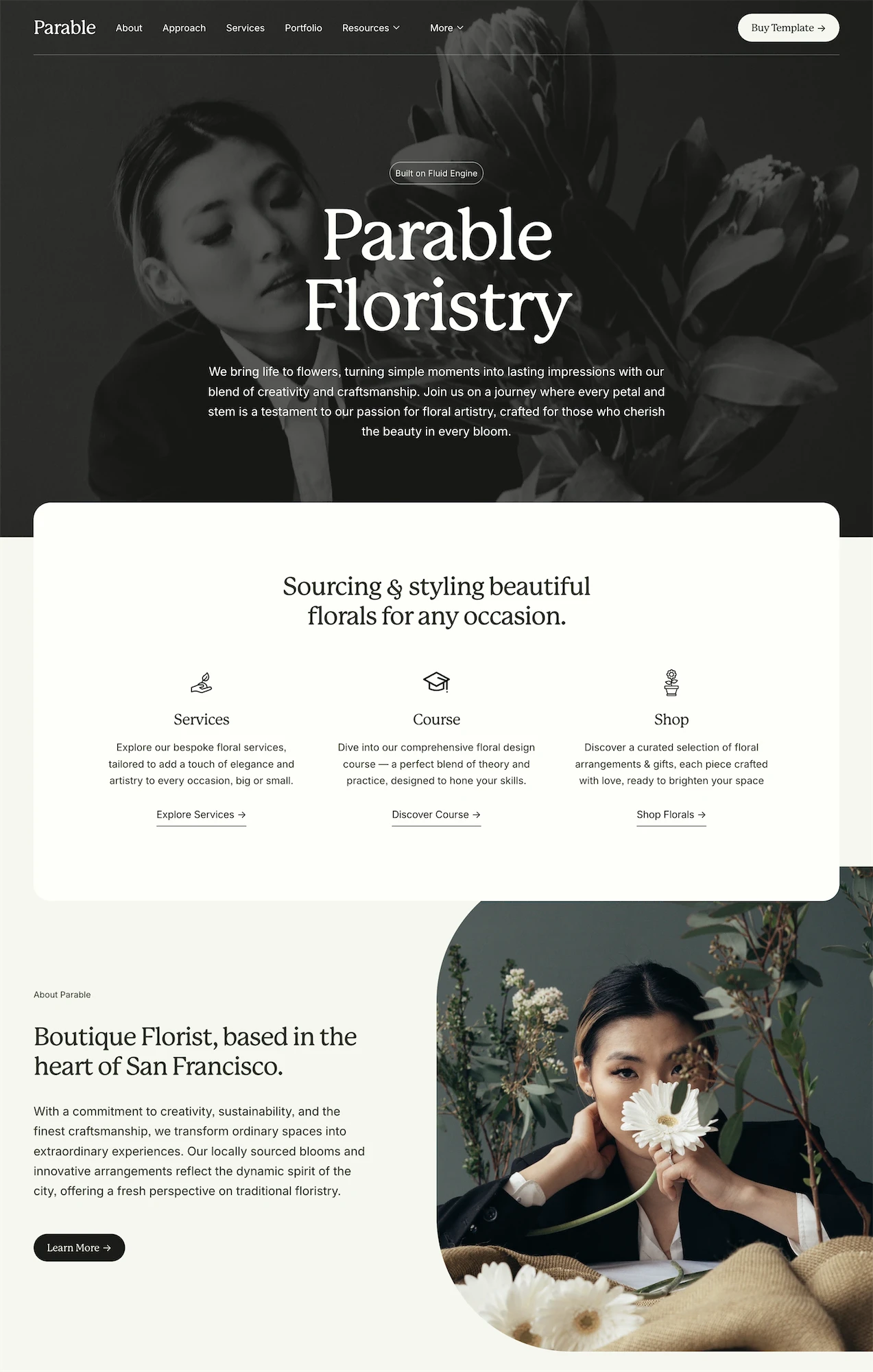
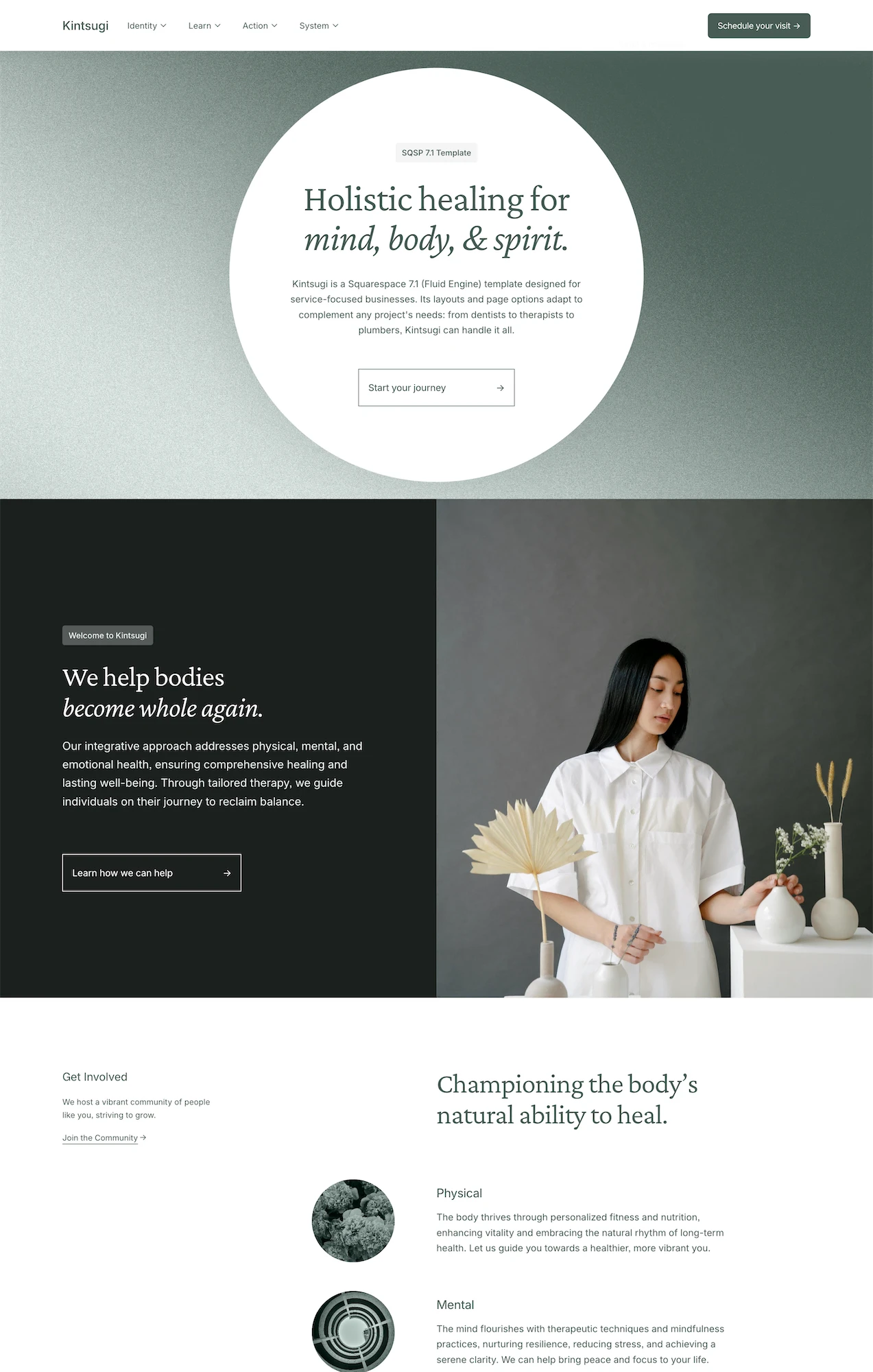
If you're building on Squarespace and want a homepage structure that's already been designed with these principles in mind, Studio Mesa templates like Parable and Kintsugi ship with 15 pre-built pages, including homepages structured around clear messaging, social proof, and conversion-focused CTAs. The premium vs. free template comparison breaks down where the structural differences matter most.
Article summary
Your homepage hero section needs three things: a clear headline, a supporting statement, and a visible call to action. Get those right and people scroll. Get them wrong and they leave. This post breaks down what belongs above the fold, what doesn't, and how to structure the rest of your homepage so it actually moves visitors toward a decision.
What "Above the Fold" Means
Above the fold is the portion of your page that's visible without scrolling. On desktop, that's roughly the top 600–800 pixels. On mobile, it's less.
This area gets disproportionate attention. Eye-tracking studies consistently show that visitors spend more time looking at content above the fold than below it. That doesn't mean below-the-fold content is irrelevant. It means the top of your page sets the terms for everything that follows.
If the first thing someone sees is a vague headline over a stock photo of a handshake, they're gone. If they see a specific statement about what you do and who you help, they keep reading.
The Three Things That Belong Above the Fold
A Headline That Says What You Do
Your homepage headline is the single most important piece of copy on your entire site. It should communicate what your business does in plain language.
Not a tagline. Not a slogan. Not a clever play on words. A statement that a stranger could read and immediately understand your business.
Weak Headline | Stronger Headline |
|---|---|
"Empowering Your Journey" | "Family Law Attorney in Portland" |
"Where Vision Meets Purpose" | "Bookkeeping for Freelancers and Small Agencies" |
"Welcome to Our Community" | "A Church in Downtown Raleigh" |
"Transforming Lives Together" | "Outpatient Therapy for Anxiety and Depression" |
The weak headlines could apply to almost any business. The stronger ones tell you exactly what the business is and, in some cases, where it operates. That specificity is what keeps people on your site.
A Supporting Statement
Below your headline, add one to two sentences that expand on it. This is where you can add context about who you serve, what makes your approach different, or what outcome people can expect.
Keep it short. This isn't the place for your full story. That's what your about page is for.
A good supporting statement answers a follow-up question the visitor would naturally have after reading your headline. If your headline is "Bookkeeping for Freelancers and Small Agencies," a supporting statement might be: "Monthly bookkeeping, tax prep, and financial reports so you can stop guessing and start making informed decisions about your business."
A Call to Action
Every homepage needs a visible button above the fold. It should tell visitors exactly what happens when they click it.
"Get Started" is vague. "Book a Free Consultation" is specific. "Learn More" is passive. "View Services" is direct.
The best call-to-action text reflects the actual next step in your customer journey. If most of your clients start with a phone call, the button should say "Schedule a Call." If they start by browsing your services, use "View Services." If they book online, use "Book an Appointment."
One primary button is enough above the fold. You can add a secondary, less prominent link if needed ("Or learn more about how it works"), but don't stack three buttons and hope visitors figure out which one matters.
What Doesn't Belong Above the Fold
Sliders and carousels. Auto-rotating image sliders were popular in 2014. They're ineffective. Most visitors don't watch past the first slide, and the constant motion competes with your headline for attention. Use a single, strong image instead.
Your logo at massive scale. Your logo should be in the navigation bar. It doesn't need to dominate the hero section. If your logo is the biggest thing above the fold, you've prioritized branding over communication.
A full-screen video with no text overlay. Background video can work, but only if there's still a readable headline and CTA layered on top. If visitors have to wait for the video to load (or watch the whole thing) before they understand what your site is about, you've already lost them.
Social media icons. Putting social links above the fold is asking people to leave your site before they've engaged with it. Social links belong in the footer.
Navigation overload. A clean nav bar with five to seven links is fine. Mega menus with 30 options create decision paralysis at the worst possible moment.
Structuring the Rest of Your Homepage
The content below the fold should build on the promise you made above it. Think of your homepage as a guided conversation, not a brochure.
Section 1: Social Proof
Immediately after the hero, give visitors a reason to trust you. This could be client logos, a row of short testimonials, a star rating count, or a brief "as seen in" mention. Social proof early in the page reinforces the headline and reduces skepticism before you ask for anything.
Section 2: Services or Offerings Overview
Summarize what you offer in three to four short blocks. Each block gets a title, a one-sentence description, and a link to the full page. Don't try to explain everything here. The goal is orientation, not comprehensive detail.
Section 3: About Teaser
A brief section with a photo and two to three sentences about who you are. Link to your full about page. People want to know who's behind the business, but they don't need your entire biography on the homepage.
Section 4: Featured Content or Results
Depending on your business, this section might showcase case studies, blog posts, portfolio pieces, or impact metrics. A nonprofit might show donation totals and program outcomes. A creative agency might display three recent projects. A therapist might feature a blog post on a common concern.
Section 5: Final Call to Action
Close the homepage with a clear, repeated CTA. By this point, visitors have scrolled through your credibility, your offerings, and your story. Give them one more chance to take the next step. A simple section with a headline like "Ready to get started?" and a button works.
Common Mistakes
Too many competing messages. If your homepage tries to speak to five different audiences simultaneously, it speaks to none of them clearly. Pick your primary audience and write for them. Secondary audiences can find their way through your navigation.
Burying the CTA. If visitors have to scroll through 2,000 pixels of content before they see a button, most won't make it. Place CTAs at the top, in the middle, and at the bottom of your homepage.
Using abstract imagery. A photo of a mountain at sunset doesn't tell anyone what your business does. Use images that are relevant to your work, your team, or your clients. Real photos outperform generic stock images in nearly every context.
Designing for yourself instead of your visitor. You already know what your business does. Your visitor doesn't. Every design decision on your homepage should be evaluated from the perspective of someone who has never heard of you and landed on your site from a Google search.
How to Test What's Working
You don't need expensive tools to evaluate your homepage. Two simple methods:
The five-second test. Show your homepage to someone unfamiliar with your business for five seconds, then close it. Ask them: "What does this business do?" and "What would you do next on this site?" If they can't answer both questions, your above-the-fold content needs work.
Scroll depth in analytics. Squarespace's built-in analytics show you where visitors drop off. If most visitors aren't scrolling past the second section, the content below the hero might not be compelling enough to keep them going. Google Analytics provides more granular scroll tracking if you need it. For help setting that up, the complete guide to Squarespace SEO covers analytics integration.
Start Building
Your homepage doesn't need to be complicated. It needs to be clear. A specific headline, a supporting statement, a visible CTA, and a logical flow of content below the fold will outperform a heavily designed page that doesn't communicate anything specific.
If you're building on Squarespace and want a homepage structure that's already been designed with these principles in mind, Studio Mesa templates like Parable and Kintsugi ship with 15 pre-built pages, including homepages structured around clear messaging, social proof, and conversion-focused CTAs. The premium vs. free template comparison breaks down where the structural differences matter most.
Article summary
Your homepage hero section needs three things: a clear headline, a supporting statement, and a visible call to action. Get those right and people scroll. Get them wrong and they leave. This post breaks down what belongs above the fold, what doesn't, and how to structure the rest of your homepage so it actually moves visitors toward a decision.
What "Above the Fold" Means
Above the fold is the portion of your page that's visible without scrolling. On desktop, that's roughly the top 600–800 pixels. On mobile, it's less.
This area gets disproportionate attention. Eye-tracking studies consistently show that visitors spend more time looking at content above the fold than below it. That doesn't mean below-the-fold content is irrelevant. It means the top of your page sets the terms for everything that follows.
If the first thing someone sees is a vague headline over a stock photo of a handshake, they're gone. If they see a specific statement about what you do and who you help, they keep reading.
The Three Things That Belong Above the Fold
A Headline That Says What You Do
Your homepage headline is the single most important piece of copy on your entire site. It should communicate what your business does in plain language.
Not a tagline. Not a slogan. Not a clever play on words. A statement that a stranger could read and immediately understand your business.
Weak Headline | Stronger Headline |
|---|---|
"Empowering Your Journey" | "Family Law Attorney in Portland" |
"Where Vision Meets Purpose" | "Bookkeeping for Freelancers and Small Agencies" |
"Welcome to Our Community" | "A Church in Downtown Raleigh" |
"Transforming Lives Together" | "Outpatient Therapy for Anxiety and Depression" |
The weak headlines could apply to almost any business. The stronger ones tell you exactly what the business is and, in some cases, where it operates. That specificity is what keeps people on your site.
A Supporting Statement
Below your headline, add one to two sentences that expand on it. This is where you can add context about who you serve, what makes your approach different, or what outcome people can expect.
Keep it short. This isn't the place for your full story. That's what your about page is for.
A good supporting statement answers a follow-up question the visitor would naturally have after reading your headline. If your headline is "Bookkeeping for Freelancers and Small Agencies," a supporting statement might be: "Monthly bookkeeping, tax prep, and financial reports so you can stop guessing and start making informed decisions about your business."
A Call to Action
Every homepage needs a visible button above the fold. It should tell visitors exactly what happens when they click it.
"Get Started" is vague. "Book a Free Consultation" is specific. "Learn More" is passive. "View Services" is direct.
The best call-to-action text reflects the actual next step in your customer journey. If most of your clients start with a phone call, the button should say "Schedule a Call." If they start by browsing your services, use "View Services." If they book online, use "Book an Appointment."
One primary button is enough above the fold. You can add a secondary, less prominent link if needed ("Or learn more about how it works"), but don't stack three buttons and hope visitors figure out which one matters.
What Doesn't Belong Above the Fold
Sliders and carousels. Auto-rotating image sliders were popular in 2014. They're ineffective. Most visitors don't watch past the first slide, and the constant motion competes with your headline for attention. Use a single, strong image instead.
Your logo at massive scale. Your logo should be in the navigation bar. It doesn't need to dominate the hero section. If your logo is the biggest thing above the fold, you've prioritized branding over communication.
A full-screen video with no text overlay. Background video can work, but only if there's still a readable headline and CTA layered on top. If visitors have to wait for the video to load (or watch the whole thing) before they understand what your site is about, you've already lost them.
Social media icons. Putting social links above the fold is asking people to leave your site before they've engaged with it. Social links belong in the footer.
Navigation overload. A clean nav bar with five to seven links is fine. Mega menus with 30 options create decision paralysis at the worst possible moment.
Structuring the Rest of Your Homepage
The content below the fold should build on the promise you made above it. Think of your homepage as a guided conversation, not a brochure.
Section 1: Social Proof
Immediately after the hero, give visitors a reason to trust you. This could be client logos, a row of short testimonials, a star rating count, or a brief "as seen in" mention. Social proof early in the page reinforces the headline and reduces skepticism before you ask for anything.
Section 2: Services or Offerings Overview
Summarize what you offer in three to four short blocks. Each block gets a title, a one-sentence description, and a link to the full page. Don't try to explain everything here. The goal is orientation, not comprehensive detail.
Section 3: About Teaser
A brief section with a photo and two to three sentences about who you are. Link to your full about page. People want to know who's behind the business, but they don't need your entire biography on the homepage.
Section 4: Featured Content or Results
Depending on your business, this section might showcase case studies, blog posts, portfolio pieces, or impact metrics. A nonprofit might show donation totals and program outcomes. A creative agency might display three recent projects. A therapist might feature a blog post on a common concern.
Section 5: Final Call to Action
Close the homepage with a clear, repeated CTA. By this point, visitors have scrolled through your credibility, your offerings, and your story. Give them one more chance to take the next step. A simple section with a headline like "Ready to get started?" and a button works.
Common Mistakes
Too many competing messages. If your homepage tries to speak to five different audiences simultaneously, it speaks to none of them clearly. Pick your primary audience and write for them. Secondary audiences can find their way through your navigation.
Burying the CTA. If visitors have to scroll through 2,000 pixels of content before they see a button, most won't make it. Place CTAs at the top, in the middle, and at the bottom of your homepage.
Using abstract imagery. A photo of a mountain at sunset doesn't tell anyone what your business does. Use images that are relevant to your work, your team, or your clients. Real photos outperform generic stock images in nearly every context.
Designing for yourself instead of your visitor. You already know what your business does. Your visitor doesn't. Every design decision on your homepage should be evaluated from the perspective of someone who has never heard of you and landed on your site from a Google search.
How to Test What's Working
You don't need expensive tools to evaluate your homepage. Two simple methods:
The five-second test. Show your homepage to someone unfamiliar with your business for five seconds, then close it. Ask them: "What does this business do?" and "What would you do next on this site?" If they can't answer both questions, your above-the-fold content needs work.
Scroll depth in analytics. Squarespace's built-in analytics show you where visitors drop off. If most visitors aren't scrolling past the second section, the content below the hero might not be compelling enough to keep them going. Google Analytics provides more granular scroll tracking if you need it. For help setting that up, the complete guide to Squarespace SEO covers analytics integration.
Start Building
Your homepage doesn't need to be complicated. It needs to be clear. A specific headline, a supporting statement, a visible CTA, and a logical flow of content below the fold will outperform a heavily designed page that doesn't communicate anything specific.
If you're building on Squarespace and want a homepage structure that's already been designed with these principles in mind, Studio Mesa templates like Parable and Kintsugi ship with 15 pre-built pages, including homepages structured around clear messaging, social proof, and conversion-focused CTAs. The premium vs. free template comparison breaks down where the structural differences matter most.