Article summary
A custom-designed nonprofit website typically costs $5,000 to $25,000+ from a freelancer or agency. A DIY site built on a free Squarespace template costs roughly $200-300/year for hosting with no upfront design cost. A premium Squarespace template falls in between at $200-400 one-time plus hosting, and gets you 80-90% of the custom experience at a fraction of the price. For most small to mid-size nonprofits, the template route offers the best balance of quality, speed, and budget.
The three paths
There's no single answer to "what does a nonprofit website cost" because there's no single way to build one. The three most common approaches each come with different tradeoffs around cost, quality, timeline, and ongoing maintenance.
Path 1: Hire a designer or agency
This is the premium option. You work with a professional who handles strategy, design, development, and (ideally) content guidance. The result is a fully custom site tailored to your organization.
Typical cost: $5,000 to $25,000+ depending on scope, the designer's experience, and your geographic market. Agencies in major metros tend to charge more. Freelance Squarespace specialists typically fall on the lower end. WordPress or Webflow builds tend to be higher because of the added development complexity.
What you get: A site designed around your specific mission, programs, and audience. Custom layouts, original design, content strategy, and someone who thinks through the user experience for you. The best designers will also handle SEO setup, analytics, and accessibility.
What to watch for: At the lower end of this range ($3,000-5,000), some designers are essentially installing a template and customizing it for you. That's not necessarily bad, but it's worth understanding what you're paying for. Ask what's included, how many revision rounds you get, and whether ongoing maintenance is part of the package.
Timeline: 4-12 weeks depending on complexity and how quickly your team provides content.
Best for: Nonprofits with the budget to invest in a fully custom presence, complex organizations with multiple programs or locations, and teams that don't have the bandwidth to build anything themselves.
Path 2: DIY with a free template
This is the budget option. You sign up for Squarespace (or WordPress, Wix, etc.), pick a free template, and build the site yourself.
Typical cost: $192 to $312 per year for a Squarespace subscription, depending on the plan. No upfront design cost. WordPress can be cheaper on hosting but often requires paid plugins, themes, and more technical maintenance.
What you get: A functional, professional-looking website that you control entirely. Squarespace's free templates are well-designed and mobile-responsive. You have full access to customize colors, fonts, layouts, and content.
What to watch for: Free templates are generic. They're designed to work for restaurants, photographers, and law firms all at once, which means they don't come with nonprofit-specific page structures like donation flows, impact pages, volunteer signups, or program directories. You'll build those from scratch, which takes time and design confidence.
The real cost of the DIY path isn't the subscription. It's the hours you spend making design decisions, building pages, troubleshooting layouts, and learning the platform. For a nonprofit executive director who's already stretched thin, those hours have a significant opportunity cost.
Timeline: Anywhere from a weekend to several months, depending on how much time you can dedicate and how comfortable you are with the tools.
Best for: Very small nonprofits with minimal budgets, organizations with a staff member who genuinely enjoys web design, and groups that need something basic up quickly.
Path 3: Premium template
This is the middle path. You purchase a pre-designed template built for nonprofits, install it on Squarespace, and customize it with your own content.
Typical cost: $150 to $400 one-time for the template, plus the same Squarespace subscription as the DIY path ($192-312/year). Some template shops charge additional fees for multi-site use. Total first-year cost is typically $350-700.
What you get: A site that's already designed with nonprofit-specific pages and features. Donation flows, impact storytelling sections, volunteer signups, program pages, event calendars, and team pages are already built. The design decisions (typography, color, spacing, layout) have been made by a professional. You just swap in your content.
What to watch for: Quality varies widely across template shops. Some premium templates are barely better than free ones with a different color scheme. Look for templates with a high page count (10-15+), niche-specific page structures, ongoing support, and a demo site that holds up across every page.
Timeline: 2-4 weeks from purchase to launch. The structure is already there, so the main work is adding your content, photos, and customizing the design to match your brand.
Best for: Most small to mid-size nonprofits. This path gives you professional quality without the professional price tag, and it saves significant time compared to building from scratch.
The hidden costs people forget
Regardless of which path you choose, there are ongoing costs that don't always show up in the initial estimate.
Domain name
Roughly $12-20 per year. You need one regardless of how you build your site. If you already own your domain, you can connect it to Squarespace.
Hosting
Squarespace includes hosting in its subscription ($16-27/month billed annually). WordPress requires separate hosting ($5-50/month depending on provider and plan). This is an ongoing cost.
Stock photography
If you don't have professional photos of your team, programs, and community, you may need stock images. Some are free (Unsplash, Pexels), others are paid ($5-25 per image from services like Shutterstock). Better yet, budget for a half-day photoshoot ($300-800) to get original images that actually represent your organization.
Email marketing
Most nonprofits need an email tool for donor communication, newsletters, and event promotion. Squarespace includes basic email campaigns in some plans. Dedicated tools like Mailchimp, ConvertKit, or Loops range from free (at low subscriber counts) to $30-100/month.
Third-party donation tools
Squarespace has built-in donation blocks, but some nonprofits prefer specialized tools like Donorbox, Givebutter, or Tithe.ly for more advanced features like peer-to-peer fundraising or donor management. These typically charge a small transaction fee (1.75-3%) on each donation.
Ongoing maintenance
Someone needs to update the site. New events, staff changes, program updates, annual report content. If nobody on your team is assigned to website maintenance, the site will go stale within a few months. Factor in either staff time or a small retainer with a designer ($50-200/month) for ongoing updates.
A realistic budget for most nonprofits
For a small to mid-size nonprofit that wants a professional, functional website without overspending, here's what a realistic first-year budget looks like using the premium template path:
Item | Cost |
|---|---|
Premium template | $200-400 (one-time) |
Squarespace subscription | $192-312/year |
Domain name | $12-20/year |
Photography (optional) | $0-800 |
Email marketing tool | $0-30/month |
Total first year | $400-1,500 |
Compare that to $5,000-25,000 for a custom build, and the value proposition is clear. You're getting a professional, niche-specific website for roughly the cost of two months of custom design work.
Where Studio Mesa fits
Studio Mesa makes premium Squarespace templates designed specifically for nonprofits, among other mission-driven organizations. Two templates in the catalog are built for nonprofit use:
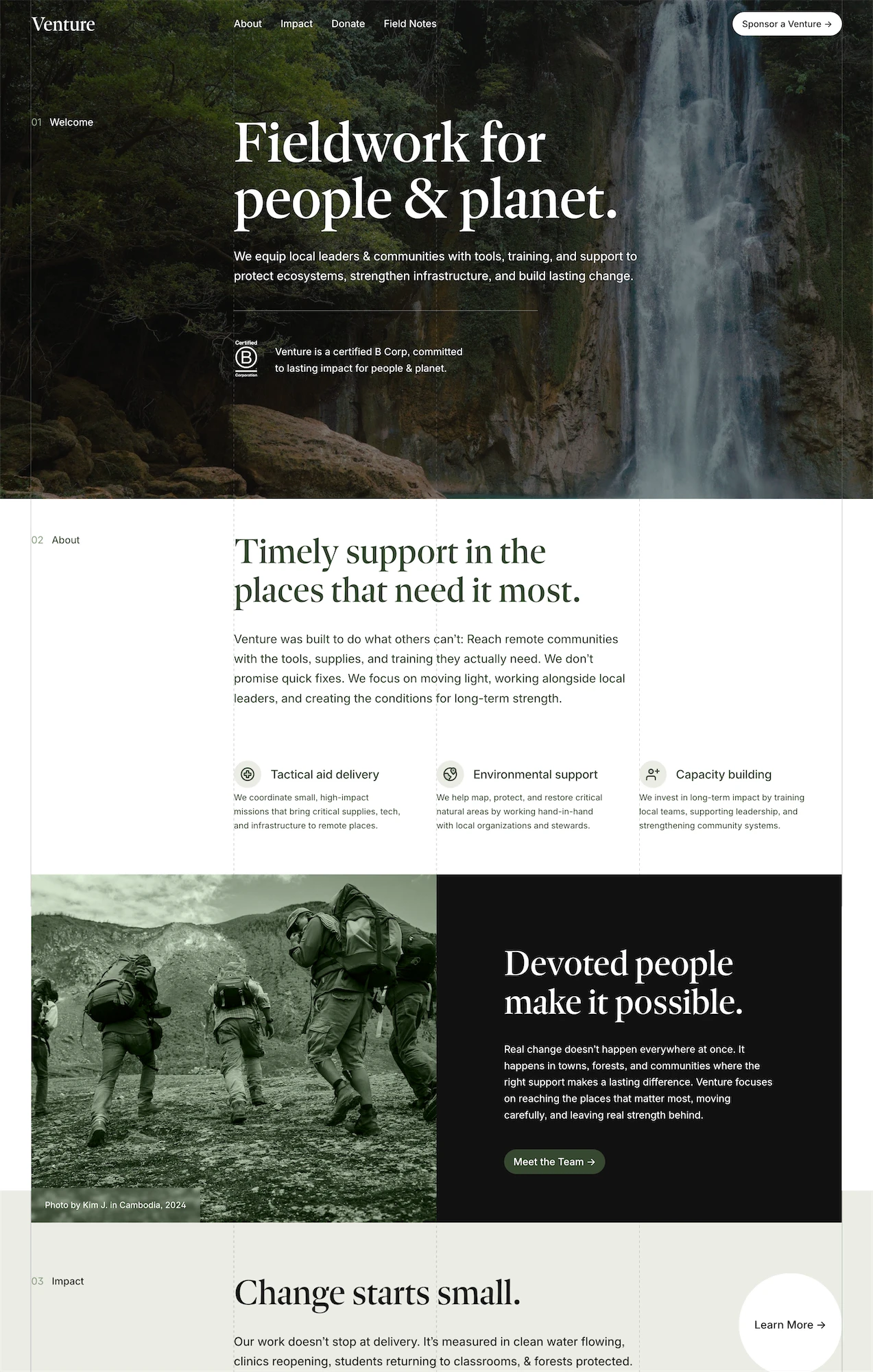
Venture is designed for nonprofits doing real work in real places. It features a grounded, mission-first layout with pages for projects, impact, donations, events, and a field blog for building organic SEO.
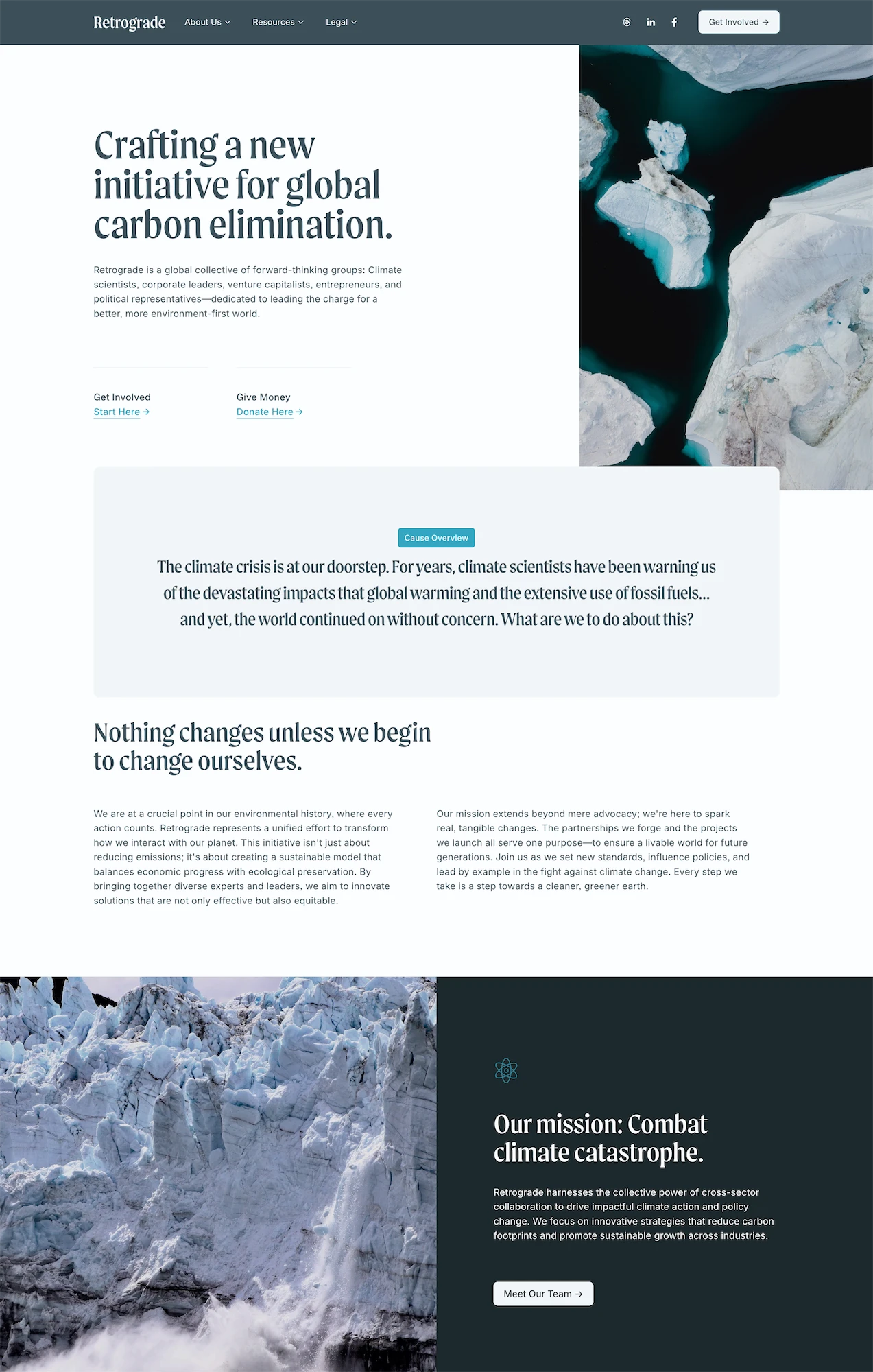
Retrograde is for nonprofits that operate more like campaigns. Bold layout, editorial tone, with press features, partner logos, a get involved page, and a donate flow built around turning visitors into advocates.
Both include 15 pages, an unlimited license, lifetime email support, and remote CSS updates for $395. Nonprofits receive a 30% discount by reaching out through the contact form.
Making the decision
If your nonprofit has the budget and the need for a fully bespoke site, hiring a designer is worth it. You'll get something nobody else has, built around your exact needs.
If your budget is extremely tight and you have someone on staff who's willing to put in the time, the free template path works. It just takes longer and requires more design decisions on your end.
For everyone in between, a premium template is the pragmatic choice. You get professional quality, nonprofit-specific structure, and a fast path to launch at a price point that respects the reality of how most nonprofits operate.
The most expensive option is the website that never launches.
Continue Reading
For a deeper look at what nonprofit websites need, read Best Squarespace Templates to Build a Nonprofit Site Fast. For help deciding between premium and free templates, check out Premium Squarespace Templates vs. Free: Is It Worth Paying?.
Article summary
A custom-designed nonprofit website typically costs $5,000 to $25,000+ from a freelancer or agency. A DIY site built on a free Squarespace template costs roughly $200-300/year for hosting with no upfront design cost. A premium Squarespace template falls in between at $200-400 one-time plus hosting, and gets you 80-90% of the custom experience at a fraction of the price. For most small to mid-size nonprofits, the template route offers the best balance of quality, speed, and budget.
The three paths
There's no single answer to "what does a nonprofit website cost" because there's no single way to build one. The three most common approaches each come with different tradeoffs around cost, quality, timeline, and ongoing maintenance.
Path 1: Hire a designer or agency
This is the premium option. You work with a professional who handles strategy, design, development, and (ideally) content guidance. The result is a fully custom site tailored to your organization.
Typical cost: $5,000 to $25,000+ depending on scope, the designer's experience, and your geographic market. Agencies in major metros tend to charge more. Freelance Squarespace specialists typically fall on the lower end. WordPress or Webflow builds tend to be higher because of the added development complexity.
What you get: A site designed around your specific mission, programs, and audience. Custom layouts, original design, content strategy, and someone who thinks through the user experience for you. The best designers will also handle SEO setup, analytics, and accessibility.
What to watch for: At the lower end of this range ($3,000-5,000), some designers are essentially installing a template and customizing it for you. That's not necessarily bad, but it's worth understanding what you're paying for. Ask what's included, how many revision rounds you get, and whether ongoing maintenance is part of the package.
Timeline: 4-12 weeks depending on complexity and how quickly your team provides content.
Best for: Nonprofits with the budget to invest in a fully custom presence, complex organizations with multiple programs or locations, and teams that don't have the bandwidth to build anything themselves.
Path 2: DIY with a free template
This is the budget option. You sign up for Squarespace (or WordPress, Wix, etc.), pick a free template, and build the site yourself.
Typical cost: $192 to $312 per year for a Squarespace subscription, depending on the plan. No upfront design cost. WordPress can be cheaper on hosting but often requires paid plugins, themes, and more technical maintenance.
What you get: A functional, professional-looking website that you control entirely. Squarespace's free templates are well-designed and mobile-responsive. You have full access to customize colors, fonts, layouts, and content.
What to watch for: Free templates are generic. They're designed to work for restaurants, photographers, and law firms all at once, which means they don't come with nonprofit-specific page structures like donation flows, impact pages, volunteer signups, or program directories. You'll build those from scratch, which takes time and design confidence.
The real cost of the DIY path isn't the subscription. It's the hours you spend making design decisions, building pages, troubleshooting layouts, and learning the platform. For a nonprofit executive director who's already stretched thin, those hours have a significant opportunity cost.
Timeline: Anywhere from a weekend to several months, depending on how much time you can dedicate and how comfortable you are with the tools.
Best for: Very small nonprofits with minimal budgets, organizations with a staff member who genuinely enjoys web design, and groups that need something basic up quickly.
Path 3: Premium template
This is the middle path. You purchase a pre-designed template built for nonprofits, install it on Squarespace, and customize it with your own content.
Typical cost: $150 to $400 one-time for the template, plus the same Squarespace subscription as the DIY path ($192-312/year). Some template shops charge additional fees for multi-site use. Total first-year cost is typically $350-700.
What you get: A site that's already designed with nonprofit-specific pages and features. Donation flows, impact storytelling sections, volunteer signups, program pages, event calendars, and team pages are already built. The design decisions (typography, color, spacing, layout) have been made by a professional. You just swap in your content.
What to watch for: Quality varies widely across template shops. Some premium templates are barely better than free ones with a different color scheme. Look for templates with a high page count (10-15+), niche-specific page structures, ongoing support, and a demo site that holds up across every page.
Timeline: 2-4 weeks from purchase to launch. The structure is already there, so the main work is adding your content, photos, and customizing the design to match your brand.
Best for: Most small to mid-size nonprofits. This path gives you professional quality without the professional price tag, and it saves significant time compared to building from scratch.
The hidden costs people forget
Regardless of which path you choose, there are ongoing costs that don't always show up in the initial estimate.
Domain name
Roughly $12-20 per year. You need one regardless of how you build your site. If you already own your domain, you can connect it to Squarespace.
Hosting
Squarespace includes hosting in its subscription ($16-27/month billed annually). WordPress requires separate hosting ($5-50/month depending on provider and plan). This is an ongoing cost.
Stock photography
If you don't have professional photos of your team, programs, and community, you may need stock images. Some are free (Unsplash, Pexels), others are paid ($5-25 per image from services like Shutterstock). Better yet, budget for a half-day photoshoot ($300-800) to get original images that actually represent your organization.
Email marketing
Most nonprofits need an email tool for donor communication, newsletters, and event promotion. Squarespace includes basic email campaigns in some plans. Dedicated tools like Mailchimp, ConvertKit, or Loops range from free (at low subscriber counts) to $30-100/month.
Third-party donation tools
Squarespace has built-in donation blocks, but some nonprofits prefer specialized tools like Donorbox, Givebutter, or Tithe.ly for more advanced features like peer-to-peer fundraising or donor management. These typically charge a small transaction fee (1.75-3%) on each donation.
Ongoing maintenance
Someone needs to update the site. New events, staff changes, program updates, annual report content. If nobody on your team is assigned to website maintenance, the site will go stale within a few months. Factor in either staff time or a small retainer with a designer ($50-200/month) for ongoing updates.
A realistic budget for most nonprofits
For a small to mid-size nonprofit that wants a professional, functional website without overspending, here's what a realistic first-year budget looks like using the premium template path:
Item | Cost |
|---|---|
Premium template | $200-400 (one-time) |
Squarespace subscription | $192-312/year |
Domain name | $12-20/year |
Photography (optional) | $0-800 |
Email marketing tool | $0-30/month |
Total first year | $400-1,500 |
Compare that to $5,000-25,000 for a custom build, and the value proposition is clear. You're getting a professional, niche-specific website for roughly the cost of two months of custom design work.
Where Studio Mesa fits
Studio Mesa makes premium Squarespace templates designed specifically for nonprofits, among other mission-driven organizations. Two templates in the catalog are built for nonprofit use:
Venture is designed for nonprofits doing real work in real places. It features a grounded, mission-first layout with pages for projects, impact, donations, events, and a field blog for building organic SEO.
Retrograde is for nonprofits that operate more like campaigns. Bold layout, editorial tone, with press features, partner logos, a get involved page, and a donate flow built around turning visitors into advocates.
Both include 15 pages, an unlimited license, lifetime email support, and remote CSS updates for $395. Nonprofits receive a 30% discount by reaching out through the contact form.
Making the decision
If your nonprofit has the budget and the need for a fully bespoke site, hiring a designer is worth it. You'll get something nobody else has, built around your exact needs.
If your budget is extremely tight and you have someone on staff who's willing to put in the time, the free template path works. It just takes longer and requires more design decisions on your end.
For everyone in between, a premium template is the pragmatic choice. You get professional quality, nonprofit-specific structure, and a fast path to launch at a price point that respects the reality of how most nonprofits operate.
The most expensive option is the website that never launches.
Continue Reading
For a deeper look at what nonprofit websites need, read Best Squarespace Templates to Build a Nonprofit Site Fast. For help deciding between premium and free templates, check out Premium Squarespace Templates vs. Free: Is It Worth Paying?.
Article summary
A custom-designed nonprofit website typically costs $5,000 to $25,000+ from a freelancer or agency. A DIY site built on a free Squarespace template costs roughly $200-300/year for hosting with no upfront design cost. A premium Squarespace template falls in between at $200-400 one-time plus hosting, and gets you 80-90% of the custom experience at a fraction of the price. For most small to mid-size nonprofits, the template route offers the best balance of quality, speed, and budget.
The three paths
There's no single answer to "what does a nonprofit website cost" because there's no single way to build one. The three most common approaches each come with different tradeoffs around cost, quality, timeline, and ongoing maintenance.
Path 1: Hire a designer or agency
This is the premium option. You work with a professional who handles strategy, design, development, and (ideally) content guidance. The result is a fully custom site tailored to your organization.
Typical cost: $5,000 to $25,000+ depending on scope, the designer's experience, and your geographic market. Agencies in major metros tend to charge more. Freelance Squarespace specialists typically fall on the lower end. WordPress or Webflow builds tend to be higher because of the added development complexity.
What you get: A site designed around your specific mission, programs, and audience. Custom layouts, original design, content strategy, and someone who thinks through the user experience for you. The best designers will also handle SEO setup, analytics, and accessibility.
What to watch for: At the lower end of this range ($3,000-5,000), some designers are essentially installing a template and customizing it for you. That's not necessarily bad, but it's worth understanding what you're paying for. Ask what's included, how many revision rounds you get, and whether ongoing maintenance is part of the package.
Timeline: 4-12 weeks depending on complexity and how quickly your team provides content.
Best for: Nonprofits with the budget to invest in a fully custom presence, complex organizations with multiple programs or locations, and teams that don't have the bandwidth to build anything themselves.
Path 2: DIY with a free template
This is the budget option. You sign up for Squarespace (or WordPress, Wix, etc.), pick a free template, and build the site yourself.
Typical cost: $192 to $312 per year for a Squarespace subscription, depending on the plan. No upfront design cost. WordPress can be cheaper on hosting but often requires paid plugins, themes, and more technical maintenance.
What you get: A functional, professional-looking website that you control entirely. Squarespace's free templates are well-designed and mobile-responsive. You have full access to customize colors, fonts, layouts, and content.
What to watch for: Free templates are generic. They're designed to work for restaurants, photographers, and law firms all at once, which means they don't come with nonprofit-specific page structures like donation flows, impact pages, volunteer signups, or program directories. You'll build those from scratch, which takes time and design confidence.
The real cost of the DIY path isn't the subscription. It's the hours you spend making design decisions, building pages, troubleshooting layouts, and learning the platform. For a nonprofit executive director who's already stretched thin, those hours have a significant opportunity cost.
Timeline: Anywhere from a weekend to several months, depending on how much time you can dedicate and how comfortable you are with the tools.
Best for: Very small nonprofits with minimal budgets, organizations with a staff member who genuinely enjoys web design, and groups that need something basic up quickly.
Path 3: Premium template
This is the middle path. You purchase a pre-designed template built for nonprofits, install it on Squarespace, and customize it with your own content.
Typical cost: $150 to $400 one-time for the template, plus the same Squarespace subscription as the DIY path ($192-312/year). Some template shops charge additional fees for multi-site use. Total first-year cost is typically $350-700.
What you get: A site that's already designed with nonprofit-specific pages and features. Donation flows, impact storytelling sections, volunteer signups, program pages, event calendars, and team pages are already built. The design decisions (typography, color, spacing, layout) have been made by a professional. You just swap in your content.
What to watch for: Quality varies widely across template shops. Some premium templates are barely better than free ones with a different color scheme. Look for templates with a high page count (10-15+), niche-specific page structures, ongoing support, and a demo site that holds up across every page.
Timeline: 2-4 weeks from purchase to launch. The structure is already there, so the main work is adding your content, photos, and customizing the design to match your brand.
Best for: Most small to mid-size nonprofits. This path gives you professional quality without the professional price tag, and it saves significant time compared to building from scratch.
The hidden costs people forget
Regardless of which path you choose, there are ongoing costs that don't always show up in the initial estimate.
Domain name
Roughly $12-20 per year. You need one regardless of how you build your site. If you already own your domain, you can connect it to Squarespace.
Hosting
Squarespace includes hosting in its subscription ($16-27/month billed annually). WordPress requires separate hosting ($5-50/month depending on provider and plan). This is an ongoing cost.
Stock photography
If you don't have professional photos of your team, programs, and community, you may need stock images. Some are free (Unsplash, Pexels), others are paid ($5-25 per image from services like Shutterstock). Better yet, budget for a half-day photoshoot ($300-800) to get original images that actually represent your organization.
Email marketing
Most nonprofits need an email tool for donor communication, newsletters, and event promotion. Squarespace includes basic email campaigns in some plans. Dedicated tools like Mailchimp, ConvertKit, or Loops range from free (at low subscriber counts) to $30-100/month.
Third-party donation tools
Squarespace has built-in donation blocks, but some nonprofits prefer specialized tools like Donorbox, Givebutter, or Tithe.ly for more advanced features like peer-to-peer fundraising or donor management. These typically charge a small transaction fee (1.75-3%) on each donation.
Ongoing maintenance
Someone needs to update the site. New events, staff changes, program updates, annual report content. If nobody on your team is assigned to website maintenance, the site will go stale within a few months. Factor in either staff time or a small retainer with a designer ($50-200/month) for ongoing updates.
A realistic budget for most nonprofits
For a small to mid-size nonprofit that wants a professional, functional website without overspending, here's what a realistic first-year budget looks like using the premium template path:
Item | Cost |
|---|---|
Premium template | $200-400 (one-time) |
Squarespace subscription | $192-312/year |
Domain name | $12-20/year |
Photography (optional) | $0-800 |
Email marketing tool | $0-30/month |
Total first year | $400-1,500 |
Compare that to $5,000-25,000 for a custom build, and the value proposition is clear. You're getting a professional, niche-specific website for roughly the cost of two months of custom design work.
Where Studio Mesa fits
Studio Mesa makes premium Squarespace templates designed specifically for nonprofits, among other mission-driven organizations. Two templates in the catalog are built for nonprofit use:
Venture is designed for nonprofits doing real work in real places. It features a grounded, mission-first layout with pages for projects, impact, donations, events, and a field blog for building organic SEO.
Retrograde is for nonprofits that operate more like campaigns. Bold layout, editorial tone, with press features, partner logos, a get involved page, and a donate flow built around turning visitors into advocates.
Both include 15 pages, an unlimited license, lifetime email support, and remote CSS updates for $395. Nonprofits receive a 30% discount by reaching out through the contact form.
Making the decision
If your nonprofit has the budget and the need for a fully bespoke site, hiring a designer is worth it. You'll get something nobody else has, built around your exact needs.
If your budget is extremely tight and you have someone on staff who's willing to put in the time, the free template path works. It just takes longer and requires more design decisions on your end.
For everyone in between, a premium template is the pragmatic choice. You get professional quality, nonprofit-specific structure, and a fast path to launch at a price point that respects the reality of how most nonprofits operate.
The most expensive option is the website that never launches.
Continue Reading
For a deeper look at what nonprofit websites need, read Best Squarespace Templates to Build a Nonprofit Site Fast. For help deciding between premium and free templates, check out Premium Squarespace Templates vs. Free: Is It Worth Paying?.