Article chapters

Article chapters

Article chapters

Guides

Squarespace Website Templates for Law Firms: What to Look For

Squarespace Website Templates for Law Firms: What to Look For

Most law firm websites look like they were built in 2014 and never touched again. Dark stock photos, walls of legal jargon, and a contact form buried on page seven. Your website is often the first impression a potential client has of your practice. It should reflect the same professionalism and attention to detail you bring to your work.

Most law firm websites look like they were built in 2014 and never touched again. Dark stock photos, walls of legal jargon, and a contact form buried on page seven. Your website is often the first impression a potential client has of your practice. It should reflect the same professionalism and attention to detail you bring to your work.

Article summary

Most law firm websites either lean too corporate (stock photos of gavels and handshakes) or too generic (a basic Squarespace template with "Your Law Firm" swapped into the header). The right template gives you a credible, well-structured site without starting from scratch. This guide covers what to look for in a Squarespace template for a legal practice, which pages you actually need, and how to evaluate whether a template fits the way your firm operates.

Why Squarespace works for law firms

Squarespace handles the technical foundation that most law firms need without requiring a developer on retainer. SSL certificates, mobile responsiveness, fast hosting, and clean URLs come standard. You're not managing plugins, security patches, or server configurations.

For solo practitioners and small firms especially, that matters. You don't have an IT department. You need a platform where you can update your bio, add a new practice area page, or publish a blog post without calling someone.

The limitation worth knowing: Squarespace doesn't have built-in client portals or case management integrations. If you need those, you'll connect third-party tools like Clio, MyCase, or LawPay through embeds or external links. That's standard across most website builders, and Squarespace handles it cleanly.


What to look for in a template

Not all templates are built with professional services in mind. A template designed for a restaurant or photographer might look beautiful, but it won't have the page structure, navigation patterns, or content hierarchy that a law firm needs. Here's what to evaluate.

Page count and structure

A law firm website needs more pages than most businesses. At minimum, you're looking at a homepage, about page, individual practice area pages, an attorney bio section, a results or case studies page, a blog, and a contact page. That's seven pages before you account for anything specific to your practice.

Most free Squarespace templates ship with three to five pages. That means you're building most of your site from scratch, which defeats the purpose of starting with a template. Look for templates with 10 or more pages that include service-oriented layouts you can repurpose for practice areas.

Navigation that scales

A solo practitioner might have four practice areas. A mid-size firm might have twelve, plus individual attorney pages, office locations, and resource sections. Your template's navigation needs to handle this without becoming cluttered.

Look for templates with dropdown menus, well-organized page hierarchies, or section-based navigation. If the demo site's menu only has four items and no dropdowns, consider how it'll look when you add eight more pages.

Content hierarchy on the homepage

Your homepage needs to communicate three things within the first few seconds: what type of law you practice, where you practice it, and how to contact you. A good template puts these front and center without requiring the visitor to scroll or hunt.

Templates built for service businesses tend to handle this better than portfolio or e-commerce templates. You want a clear headline area, a section for practice areas or services, social proof (testimonials, case results, awards), and a prominent call to action.

For more on structuring your homepage effectively, read Homepage Design Principles: What to Put Above the Fold.

Professional typography and color palette

Law firm websites need to project trust and competence. That typically means clean serif or refined sans-serif fonts, restrained color palettes, and plenty of white space. Templates with playful typography, bright accent colors, or heavy animation tend to undermine the credibility a legal practice needs.

Look at the template's demo site and ask: would a potential client take this seriously? If the design feels trendy or casual, it's probably not the right fit.


Pages every law firm website needs

Homepage

The homepage is your firm's elevator pitch in visual form. Lead with a clear statement of what you do and who you serve. Follow with practice areas, a brief credibility section (years of experience, case results, notable recognitions), and a contact prompt.

Avoid the temptation to put everything on the homepage. Its job is to orient visitors and route them to the right page, not to serve as an exhaustive overview of your entire practice.

Practice area pages

Each practice area deserves its own page. This is one of the most common mistakes on law firm websites: lumping all practice areas onto a single page with a short paragraph each.

Individual practice area pages let you write detailed, keyword-rich content that ranks in search. Someone searching "personal injury attorney Tampa" is far more likely to land on a dedicated personal injury page than a generic services overview. Each page should explain what the practice area involves, who it's for, what the process looks like, and how to get started.

If you want a deeper look at writing effective service pages, check out How to Create a Services Page That Converts.

Attorney bios

Every attorney at your firm needs a dedicated bio page, not just a headshot and a list of credentials on a team page. Potential clients want to know who they'll be working with. A strong bio includes a professional photo, education and bar admissions, practice focus, professional background, and something that makes the attorney feel like a real person.

Results or case studies

Prospective clients want evidence that you can deliver. A results page with case outcomes, settlements, or client success stories (anonymized where necessary) builds confidence. If your practice area allows it, this is one of the highest-converting pages on a law firm website.

Blog or resources section

A regularly updated blog serves two purposes. It helps your site rank for long-tail search queries related to your practice areas, and it gives potential clients a sense of your expertise before they ever pick up the phone. Write about questions your clients actually ask. Explain legal processes in plain language. Cover changes in the law that affect the people you serve.

For a comprehensive guide on making your blog work for search, read The Complete Guide to Squarespace SEO.

Contact page

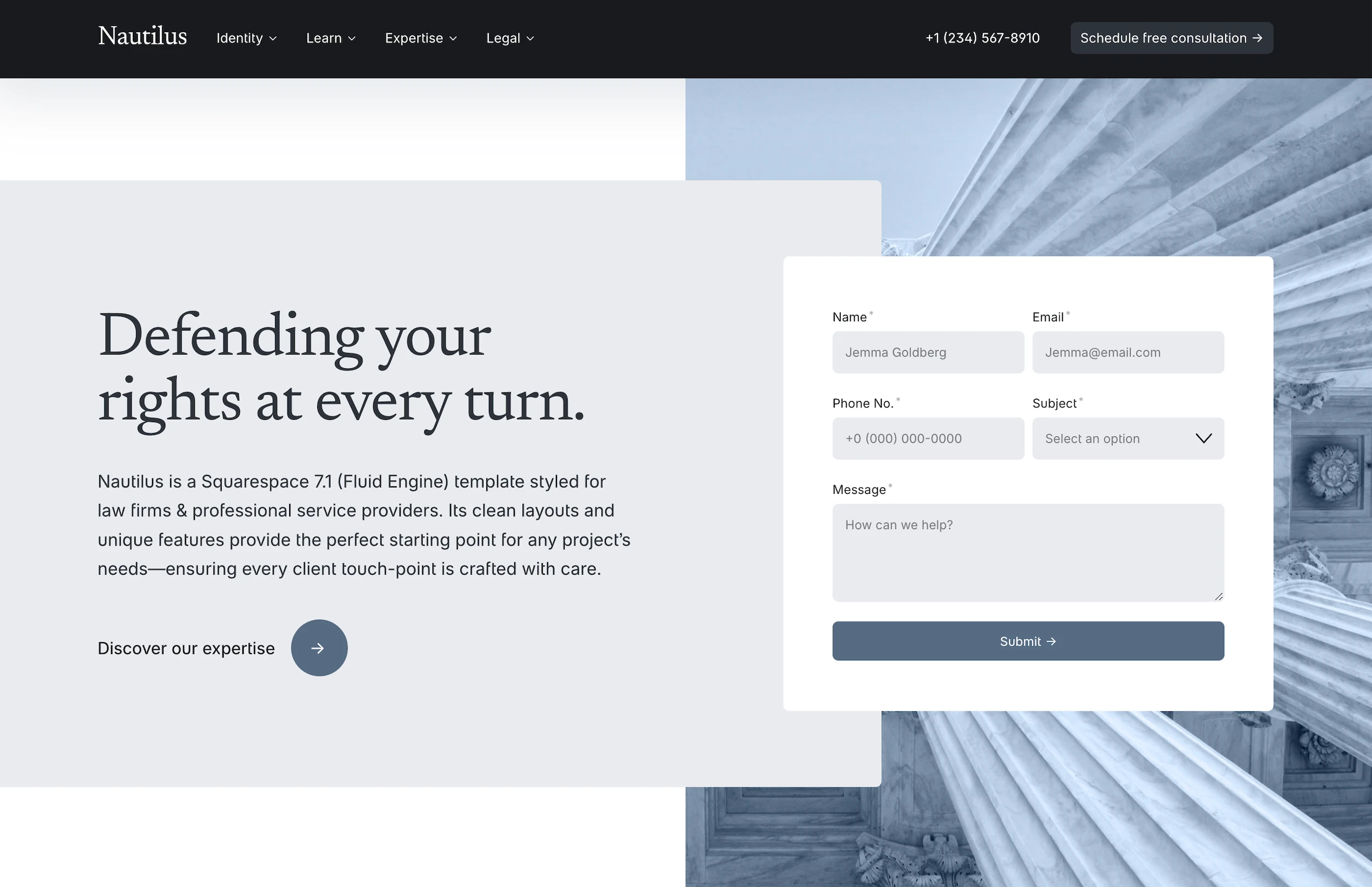
Your contact page should be straightforward. Include your phone number, email, office address, hours, and a contact form. If you have multiple offices, list them clearly with individual addresses and phone numbers.

A well-designed contact form for a law firm should include a dropdown for the type of legal matter (matching your practice areas), which helps you route inquiries and respond with relevant information. For more on building effective forms, see How to Create a Contact Form That Actually Converts on Squarespace.

Features that matter for legal practices

Scheduling integration

Many law firms offer free consultations. Embedding a scheduling tool like Calendly or Acuity directly on your site eliminates the back-and-forth of booking over email. Squarespace supports these through embed blocks or direct integrations, and the right template will have a natural place for this on the homepage or contact page.

SSL and security indicators

Every Squarespace site includes a free SSL certificate. This matters for law firms because potential clients are sharing sensitive information through your contact form. The padlock icon in the browser builds trust, and Google uses SSL as a ranking factor.

Mobile responsiveness

More than half of website traffic comes from mobile devices. If your site doesn't look and function well on a phone, you're losing potential clients before they even read your first paragraph. Squarespace templates are responsive by default, but some handle the mobile experience better than others. Always check the demo site on your phone before committing.

Local SEO readiness

For most law firms, local search is the primary traffic source. Your template should make it easy to include your office address, embed a Google Map, and structure your content around location-specific keywords. If you're targeting clients in a specific city or region, your site's content and metadata need to reflect that.

If you're a solo practitioner or small firm, the principles in Local SEO for Therapists: How to Rank in Your City apply directly to legal practices as well.


Free templates vs. premium templates

Squarespace's free templates are a starting point, but for a law firm, they create more work than they save. Most ship with three to five generic pages, no practice-area structure, and layouts designed for visual portfolios or online stores rather than professional services.

A premium template built for professional services gives you a head start: pre-built practice area pages, attorney bio layouts, testimonial sections, and a navigation structure that accounts for the depth a legal website needs. The time you save on structure and design goes back into writing content and serving clients.

For a detailed comparison of what you get with a premium template versus starting from scratch, read Premium Squarespace Templates vs. Free: Is It Worth Paying?.


Common mistakes on law firm websites

Stock photos of gavels, scales, and courthouses. These images are generic, overused, and don't differentiate your firm. Use real photos of your team, your office, or your community. If you don't have professional photos yet, use a clean template that relies on typography and layout rather than large hero images.

Jargon-heavy copy. Your website isn't a legal brief. Write for the person who just got served with divorce papers and is searching for help at 11 PM. Clear, plain language builds more trust than Latin phrases.

No clear call to action. Every page should make it obvious what the visitor should do next. Call you. Fill out the contact form. Schedule a consultation. If a visitor finishes reading a practice area page and doesn't know what step to take, the page isn't doing its job.

Burying the phone number. Many potential law firm clients still prefer to call. Make your phone number visible in the header or at the top of every page, not just on the contact page.


Start building

If you're building or rebuilding a law firm website on Squarespace, the template you start with determines how much work you'll need to do and how professional the result will look.

Nautilus is a Squarespace template designed specifically for law firms and professional services. It includes 15 pages with practice area layouts, attorney bio sections, a results page, blog, and contact structure built around how a legal practice actually operates online. Every purchase includes an unlimited license, instant delivery, lifetime email support, and a 25% Squarespace hosting discount.

Article summary

Most law firm websites either lean too corporate (stock photos of gavels and handshakes) or too generic (a basic Squarespace template with "Your Law Firm" swapped into the header). The right template gives you a credible, well-structured site without starting from scratch. This guide covers what to look for in a Squarespace template for a legal practice, which pages you actually need, and how to evaluate whether a template fits the way your firm operates.

Why Squarespace works for law firms

Squarespace handles the technical foundation that most law firms need without requiring a developer on retainer. SSL certificates, mobile responsiveness, fast hosting, and clean URLs come standard. You're not managing plugins, security patches, or server configurations.

For solo practitioners and small firms especially, that matters. You don't have an IT department. You need a platform where you can update your bio, add a new practice area page, or publish a blog post without calling someone.

The limitation worth knowing: Squarespace doesn't have built-in client portals or case management integrations. If you need those, you'll connect third-party tools like Clio, MyCase, or LawPay through embeds or external links. That's standard across most website builders, and Squarespace handles it cleanly.


What to look for in a template

Not all templates are built with professional services in mind. A template designed for a restaurant or photographer might look beautiful, but it won't have the page structure, navigation patterns, or content hierarchy that a law firm needs. Here's what to evaluate.

Page count and structure

A law firm website needs more pages than most businesses. At minimum, you're looking at a homepage, about page, individual practice area pages, an attorney bio section, a results or case studies page, a blog, and a contact page. That's seven pages before you account for anything specific to your practice.

Most free Squarespace templates ship with three to five pages. That means you're building most of your site from scratch, which defeats the purpose of starting with a template. Look for templates with 10 or more pages that include service-oriented layouts you can repurpose for practice areas.

Navigation that scales

A solo practitioner might have four practice areas. A mid-size firm might have twelve, plus individual attorney pages, office locations, and resource sections. Your template's navigation needs to handle this without becoming cluttered.

Look for templates with dropdown menus, well-organized page hierarchies, or section-based navigation. If the demo site's menu only has four items and no dropdowns, consider how it'll look when you add eight more pages.

Content hierarchy on the homepage

Your homepage needs to communicate three things within the first few seconds: what type of law you practice, where you practice it, and how to contact you. A good template puts these front and center without requiring the visitor to scroll or hunt.

Templates built for service businesses tend to handle this better than portfolio or e-commerce templates. You want a clear headline area, a section for practice areas or services, social proof (testimonials, case results, awards), and a prominent call to action.

For more on structuring your homepage effectively, read Homepage Design Principles: What to Put Above the Fold.

Professional typography and color palette

Law firm websites need to project trust and competence. That typically means clean serif or refined sans-serif fonts, restrained color palettes, and plenty of white space. Templates with playful typography, bright accent colors, or heavy animation tend to undermine the credibility a legal practice needs.

Look at the template's demo site and ask: would a potential client take this seriously? If the design feels trendy or casual, it's probably not the right fit.


Pages every law firm website needs

Homepage

The homepage is your firm's elevator pitch in visual form. Lead with a clear statement of what you do and who you serve. Follow with practice areas, a brief credibility section (years of experience, case results, notable recognitions), and a contact prompt.

Avoid the temptation to put everything on the homepage. Its job is to orient visitors and route them to the right page, not to serve as an exhaustive overview of your entire practice.

Practice area pages

Each practice area deserves its own page. This is one of the most common mistakes on law firm websites: lumping all practice areas onto a single page with a short paragraph each.

Individual practice area pages let you write detailed, keyword-rich content that ranks in search. Someone searching "personal injury attorney Tampa" is far more likely to land on a dedicated personal injury page than a generic services overview. Each page should explain what the practice area involves, who it's for, what the process looks like, and how to get started.

If you want a deeper look at writing effective service pages, check out How to Create a Services Page That Converts.

Attorney bios

Every attorney at your firm needs a dedicated bio page, not just a headshot and a list of credentials on a team page. Potential clients want to know who they'll be working with. A strong bio includes a professional photo, education and bar admissions, practice focus, professional background, and something that makes the attorney feel like a real person.

Results or case studies

Prospective clients want evidence that you can deliver. A results page with case outcomes, settlements, or client success stories (anonymized where necessary) builds confidence. If your practice area allows it, this is one of the highest-converting pages on a law firm website.

Blog or resources section

A regularly updated blog serves two purposes. It helps your site rank for long-tail search queries related to your practice areas, and it gives potential clients a sense of your expertise before they ever pick up the phone. Write about questions your clients actually ask. Explain legal processes in plain language. Cover changes in the law that affect the people you serve.

For a comprehensive guide on making your blog work for search, read The Complete Guide to Squarespace SEO.

Contact page

Your contact page should be straightforward. Include your phone number, email, office address, hours, and a contact form. If you have multiple offices, list them clearly with individual addresses and phone numbers.

A well-designed contact form for a law firm should include a dropdown for the type of legal matter (matching your practice areas), which helps you route inquiries and respond with relevant information. For more on building effective forms, see How to Create a Contact Form That Actually Converts on Squarespace.


Features that matter for legal practices

Scheduling integration

Many law firms offer free consultations. Embedding a scheduling tool like Calendly or Acuity directly on your site eliminates the back-and-forth of booking over email. Squarespace supports these through embed blocks or direct integrations, and the right template will have a natural place for this on the homepage or contact page.

SSL and security indicators

Every Squarespace site includes a free SSL certificate. This matters for law firms because potential clients are sharing sensitive information through your contact form. The padlock icon in the browser builds trust, and Google uses SSL as a ranking factor.

Mobile responsiveness

More than half of website traffic comes from mobile devices. If your site doesn't look and function well on a phone, you're losing potential clients before they even read your first paragraph. Squarespace templates are responsive by default, but some handle the mobile experience better than others. Always check the demo site on your phone before committing.

Local SEO readiness

For most law firms, local search is the primary traffic source. Your template should make it easy to include your office address, embed a Google Map, and structure your content around location-specific keywords. If you're targeting clients in a specific city or region, your site's content and metadata need to reflect that.

If you're a solo practitioner or small firm, the principles in Local SEO for Therapists: How to Rank in Your City apply directly to legal practices as well.


Free templates vs. premium templates

Squarespace's free templates are a starting point, but for a law firm, they create more work than they save. Most ship with three to five generic pages, no practice-area structure, and layouts designed for visual portfolios or online stores rather than professional services.

A premium template built for professional services gives you a head start: pre-built practice area pages, attorney bio layouts, testimonial sections, and a navigation structure that accounts for the depth a legal website needs. The time you save on structure and design goes back into writing content and serving clients.

For a detailed comparison of what you get with a premium template versus starting from scratch, read Premium Squarespace Templates vs. Free: Is It Worth Paying?.


Common mistakes on law firm websites

Stock photos of gavels, scales, and courthouses. These images are generic, overused, and don't differentiate your firm. Use real photos of your team, your office, or your community. If you don't have professional photos yet, use a clean template that relies on typography and layout rather than large hero images.

Jargon-heavy copy. Your website isn't a legal brief. Write for the person who just got served with divorce papers and is searching for help at 11 PM. Clear, plain language builds more trust than Latin phrases.

No clear call to action. Every page should make it obvious what the visitor should do next. Call you. Fill out the contact form. Schedule a consultation. If a visitor finishes reading a practice area page and doesn't know what step to take, the page isn't doing its job.

Burying the phone number. Many potential law firm clients still prefer to call. Make your phone number visible in the header or at the top of every page, not just on the contact page.


Start building

If you're building or rebuilding a law firm website on Squarespace, the template you start with determines how much work you'll need to do and how professional the result will look.

Nautilus is a Squarespace template designed specifically for law firms and professional services. It includes 15 pages with practice area layouts, attorney bio sections, a results page, blog, and contact structure built around how a legal practice actually operates online. Every purchase includes an unlimited license, instant delivery, lifetime email support, and a 25% Squarespace hosting discount.

Article summary

Most law firm websites either lean too corporate (stock photos of gavels and handshakes) or too generic (a basic Squarespace template with "Your Law Firm" swapped into the header). The right template gives you a credible, well-structured site without starting from scratch. This guide covers what to look for in a Squarespace template for a legal practice, which pages you actually need, and how to evaluate whether a template fits the way your firm operates.

Why Squarespace works for law firms

Squarespace handles the technical foundation that most law firms need without requiring a developer on retainer. SSL certificates, mobile responsiveness, fast hosting, and clean URLs come standard. You're not managing plugins, security patches, or server configurations.

For solo practitioners and small firms especially, that matters. You don't have an IT department. You need a platform where you can update your bio, add a new practice area page, or publish a blog post without calling someone.

The limitation worth knowing: Squarespace doesn't have built-in client portals or case management integrations. If you need those, you'll connect third-party tools like Clio, MyCase, or LawPay through embeds or external links. That's standard across most website builders, and Squarespace handles it cleanly.


What to look for in a template

Not all templates are built with professional services in mind. A template designed for a restaurant or photographer might look beautiful, but it won't have the page structure, navigation patterns, or content hierarchy that a law firm needs. Here's what to evaluate.

Page count and structure

A law firm website needs more pages than most businesses. At minimum, you're looking at a homepage, about page, individual practice area pages, an attorney bio section, a results or case studies page, a blog, and a contact page. That's seven pages before you account for anything specific to your practice.

Most free Squarespace templates ship with three to five pages. That means you're building most of your site from scratch, which defeats the purpose of starting with a template. Look for templates with 10 or more pages that include service-oriented layouts you can repurpose for practice areas.

Navigation that scales

A solo practitioner might have four practice areas. A mid-size firm might have twelve, plus individual attorney pages, office locations, and resource sections. Your template's navigation needs to handle this without becoming cluttered.

Look for templates with dropdown menus, well-organized page hierarchies, or section-based navigation. If the demo site's menu only has four items and no dropdowns, consider how it'll look when you add eight more pages.

Content hierarchy on the homepage

Your homepage needs to communicate three things within the first few seconds: what type of law you practice, where you practice it, and how to contact you. A good template puts these front and center without requiring the visitor to scroll or hunt.

Templates built for service businesses tend to handle this better than portfolio or e-commerce templates. You want a clear headline area, a section for practice areas or services, social proof (testimonials, case results, awards), and a prominent call to action.

For more on structuring your homepage effectively, read Homepage Design Principles: What to Put Above the Fold.

Professional typography and color palette

Law firm websites need to project trust and competence. That typically means clean serif or refined sans-serif fonts, restrained color palettes, and plenty of white space. Templates with playful typography, bright accent colors, or heavy animation tend to undermine the credibility a legal practice needs.

Look at the template's demo site and ask: would a potential client take this seriously? If the design feels trendy or casual, it's probably not the right fit.


Pages every law firm website needs

Homepage

The homepage is your firm's elevator pitch in visual form. Lead with a clear statement of what you do and who you serve. Follow with practice areas, a brief credibility section (years of experience, case results, notable recognitions), and a contact prompt.

Avoid the temptation to put everything on the homepage. Its job is to orient visitors and route them to the right page, not to serve as an exhaustive overview of your entire practice.

Practice area pages

Each practice area deserves its own page. This is one of the most common mistakes on law firm websites: lumping all practice areas onto a single page with a short paragraph each.

Individual practice area pages let you write detailed, keyword-rich content that ranks in search. Someone searching "personal injury attorney Tampa" is far more likely to land on a dedicated personal injury page than a generic services overview. Each page should explain what the practice area involves, who it's for, what the process looks like, and how to get started.

If you want a deeper look at writing effective service pages, check out How to Create a Services Page That Converts.

Attorney bios

Every attorney at your firm needs a dedicated bio page, not just a headshot and a list of credentials on a team page. Potential clients want to know who they'll be working with. A strong bio includes a professional photo, education and bar admissions, practice focus, professional background, and something that makes the attorney feel like a real person.

Results or case studies

Prospective clients want evidence that you can deliver. A results page with case outcomes, settlements, or client success stories (anonymized where necessary) builds confidence. If your practice area allows it, this is one of the highest-converting pages on a law firm website.

Blog or resources section

A regularly updated blog serves two purposes. It helps your site rank for long-tail search queries related to your practice areas, and it gives potential clients a sense of your expertise before they ever pick up the phone. Write about questions your clients actually ask. Explain legal processes in plain language. Cover changes in the law that affect the people you serve.

For a comprehensive guide on making your blog work for search, read The Complete Guide to Squarespace SEO.

Contact page

Your contact page should be straightforward. Include your phone number, email, office address, hours, and a contact form. If you have multiple offices, list them clearly with individual addresses and phone numbers.

A well-designed contact form for a law firm should include a dropdown for the type of legal matter (matching your practice areas), which helps you route inquiries and respond with relevant information. For more on building effective forms, see How to Create a Contact Form That Actually Converts on Squarespace.


Features that matter for legal practices

Scheduling integration

Many law firms offer free consultations. Embedding a scheduling tool like Calendly or Acuity directly on your site eliminates the back-and-forth of booking over email. Squarespace supports these through embed blocks or direct integrations, and the right template will have a natural place for this on the homepage or contact page.

SSL and security indicators

Every Squarespace site includes a free SSL certificate. This matters for law firms because potential clients are sharing sensitive information through your contact form. The padlock icon in the browser builds trust, and Google uses SSL as a ranking factor.

Mobile responsiveness

More than half of website traffic comes from mobile devices. If your site doesn't look and function well on a phone, you're losing potential clients before they even read your first paragraph. Squarespace templates are responsive by default, but some handle the mobile experience better than others. Always check the demo site on your phone before committing.

Local SEO readiness

For most law firms, local search is the primary traffic source. Your template should make it easy to include your office address, embed a Google Map, and structure your content around location-specific keywords. If you're targeting clients in a specific city or region, your site's content and metadata need to reflect that.

If you're a solo practitioner or small firm, the principles in Local SEO for Therapists: How to Rank in Your City apply directly to legal practices as well.


Free templates vs. premium templates

Squarespace's free templates are a starting point, but for a law firm, they create more work than they save. Most ship with three to five generic pages, no practice-area structure, and layouts designed for visual portfolios or online stores rather than professional services.

A premium template built for professional services gives you a head start: pre-built practice area pages, attorney bio layouts, testimonial sections, and a navigation structure that accounts for the depth a legal website needs. The time you save on structure and design goes back into writing content and serving clients.

For a detailed comparison of what you get with a premium template versus starting from scratch, read Premium Squarespace Templates vs. Free: Is It Worth Paying?.


Common mistakes on law firm websites

Stock photos of gavels, scales, and courthouses. These images are generic, overused, and don't differentiate your firm. Use real photos of your team, your office, or your community. If you don't have professional photos yet, use a clean template that relies on typography and layout rather than large hero images.

Jargon-heavy copy. Your website isn't a legal brief. Write for the person who just got served with divorce papers and is searching for help at 11 PM. Clear, plain language builds more trust than Latin phrases.

No clear call to action. Every page should make it obvious what the visitor should do next. Call you. Fill out the contact form. Schedule a consultation. If a visitor finishes reading a practice area page and doesn't know what step to take, the page isn't doing its job.

Burying the phone number. Many potential law firm clients still prefer to call. Make your phone number visible in the header or at the top of every page, not just on the contact page.


Start building

If you're building or rebuilding a law firm website on Squarespace, the template you start with determines how much work you'll need to do and how professional the result will look.

Nautilus is a Squarespace template designed specifically for law firms and professional services. It includes 15 pages with practice area layouts, attorney bio sections, a results page, blog, and contact structure built around how a legal practice actually operates online. Every purchase includes an unlimited license, instant delivery, lifetime email support, and a 25% Squarespace hosting discount.

Templates mentioned in this post

Templates mentioned in this post

Design smarter, launch faster.

Studio Mesa makes Squarespace templates.

Templates for mission-driven businesses. All templates include 15 launch-ready pages, delivered instantly, with lifetime email support and an Unlimited License.

Subscribe

New template announcements

Design smarter, launch faster.

Studio Mesa makes Squarespace templates.

Templates for mission-driven businesses. All templates include 15 launch-ready pages, delivered instantly, with lifetime email support and an Unlimited License.

Subscribe

New template announcements

Design smarter, launch faster.

Studio Mesa makes Squarespace templates.

Templates for mission-driven businesses. All templates include 15 launch-ready pages, delivered instantly, with lifetime email support and an Unlimited License.

Subscribe

New template announcements