Personas Grid

Styles a Gallery Block as a layered user persona gallery, perfect for showcasing multiple people in a smaller form-factor.

Styles a Gallery Block as a layered user persona gallery, perfect for showcasing multiple people in a smaller form-factor.

Kintsugi

How it works

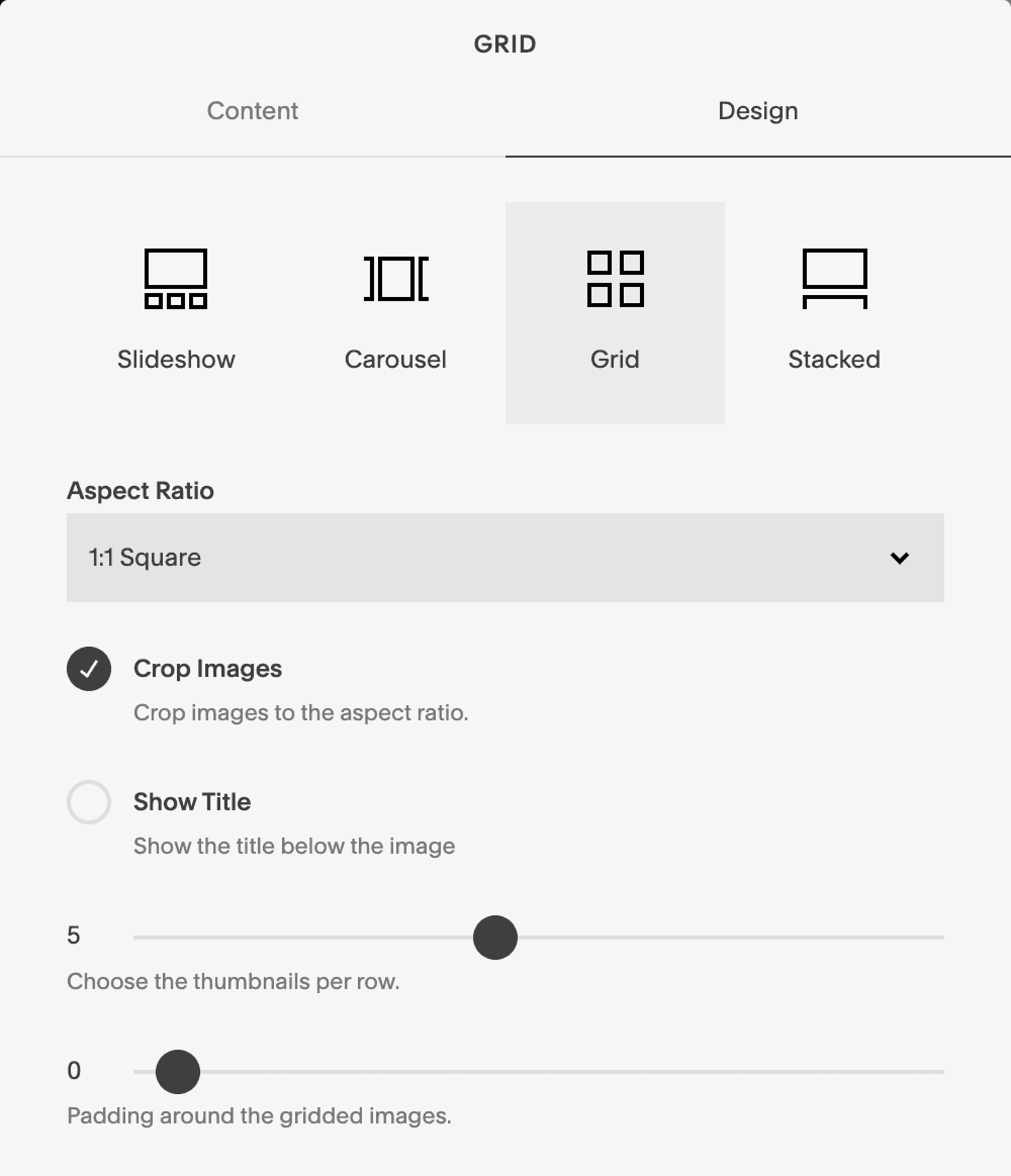
In a Gallery Block set to Grid, set the aspect ratio to 1:1, select "crop images", pick the number of items per row, and remove all padding. To change the color of the border, adjust the "Stroke Color" within that color theme's settings in Site Styles—or if you want to retain the Stroke Color and have more control, paste the snippet below into the Custom CSS window to manually set the border color.

/*Persona Grid Border*/
.sqs-gallery-aspect-ratio-square .slide.sqs-gallery-design-grid-slide{
border-color: var(--black) !important; }

/*white, light, light-bold, accent, accent-bold, dark, dark-bold, or black*/

In a Gallery Block set to Grid, set the aspect ratio to 1:1, select "crop images", pick the number of items per row, and remove all padding. To change the color of the border, adjust the "Stroke Color" within that color theme's settings in Site Styles—or if you want to retain the Stroke Color and have more control, paste the snippet below into the Custom CSS window to manually set the border color.


/*Persona Grid Border*/
.sqs-gallery-aspect-ratio-square .slide.sqs-gallery-design-grid-slide{
border-color: var(--black) !important; }

/*white, light, light-bold, accent, accent-bold, dark, dark-bold, or black*/

In a Gallery Block set to Grid, set the aspect ratio to 1:1, select "crop images", pick the number of items per row, and remove all padding. To change the color of the border, adjust the "Stroke Color" within that color theme's settings in Site Styles—or if you want to retain the Stroke Color and have more control, paste the snippet below into the Custom CSS window to manually set the border color.


/*Persona Grid Border*/
.sqs-gallery-aspect-ratio-square .slide.sqs-gallery-design-grid-slide{
border-color: var(--black) !important; }

/*white, light, light-bold, accent, accent-bold, dark, dark-bold, or black*/
Design smarter, launch faster.

Studio Mesa makes Squarespace templates.

Built for nonprofits, wellness brands, & service businesses. All designs include 15 pages of considered design, delivered instantly with lifetime email support from a real person.

Subscribe

New template announcements

Design smarter, launch faster.

Studio Mesa makes Squarespace templates.

Built for nonprofits, wellness brands, & service businesses. All designs include 15 pages of considered design, delivered instantly with lifetime email support from a real person.

Subscribe

New template announcements

Design smarter, launch faster.

Studio Mesa makes Squarespace templates.

Built for nonprofits, wellness brands, & service businesses. All designs include 15 pages of considered design, delivered instantly with lifetime email support from a real person.

Subscribe

New template announcements